A schema is the durable data contract of a system: it defines structures, relationships, types, and constraints that other code depends on. In a web application, it usually appears as database tables; in a library, core types; in a CLI, configuration; and in a data pipeline, configuration plus transformed data shape. section 7.2 section 7.8
Read a database schema as a map of the business rather than an alphabetical inventory. Tables are the important nouns, foreign keys describe relationships, enums represent state machines, constraints encode rules, and indexes reveal query paths the system has optimized. section 7.0 section 7.1
Use this workflow to turn an unfamiliar schema into a working model:
- Find the defining artifact first: schema.prisma, db/schema.rb, models.py, schema.py, a configuration schema, or a migrations directory. section 7.3
- Group related tables into a guided tour instead of reading every model in sequence; begin with the central business flow. section 7.8
- Trace one user action across reads, writes, relationships, and external services to expose runtime order and failure modes. section 7.8
- Inspect four to eight revealing fields and each index; nullable fields, defaults, enums, and unique constraints often expose past product decisions. section 7.0 section 7.1
- Read migrations chronologically when the current structure hides how the product evolved. section 7.8
A booking table as encoded policy
CREATE TABLE booking ( id SERIAL PRIMARY KEY, event_type_id INT NOT NULL REFERENCES event_type(id), start_time TIMESTAMPTZ NOT NULL, attendee_email TEXT NOT NULL, status booking_status NOT NULL DEFAULT 'pending', metadata JSONB ); An index on (start_time, event_type_id) bets on a frequent query path; a unique index on attendee_email forbids duplicates; the status enum defines a small state machine; metadata provides a JSON escape hatch. section 7.1
Use AI to produce checkable artifacts, not reassuring verdicts: request an ERD, a table-cluster tour, a user-action trace, an index analysis, or a migration timeline. Validate structured outputs before chaining them into further analysis. section 1.3.1 section 3.3.1
Figure 7.1 One Prisma schema, viewed four ways: as a relationship graph clustering 119 models around the Booking table; as a swim-lane diagram tracing a user action across tables; as a detailed view of a single table's columns and indexes; and as a history reconstructed from its migration files.
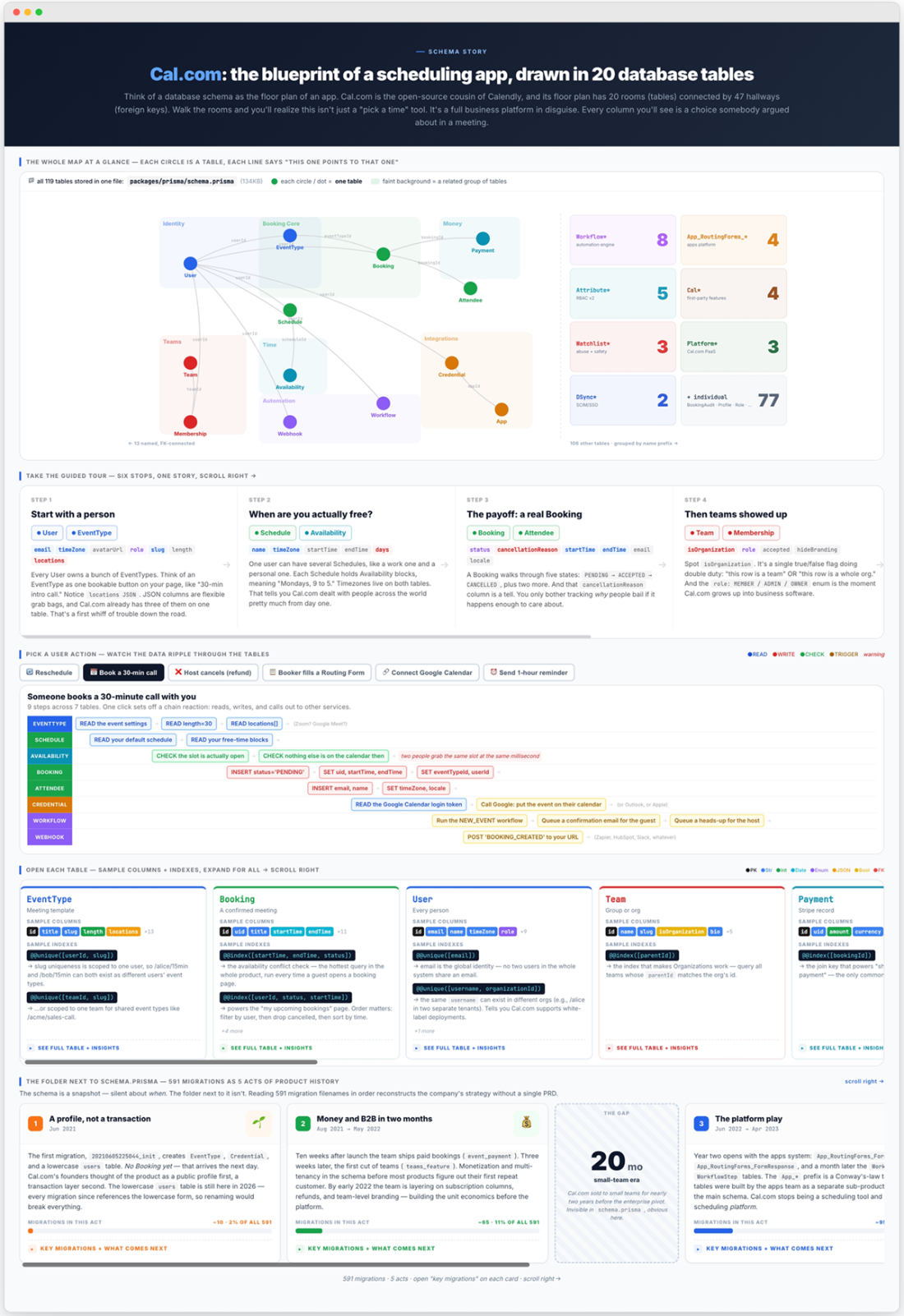
Compare a schema as a relationship graph, runtime swim-lane, detailed table view, and migration history; each view answers a different architectural question. section 7.0