A database schema is the formal shape of persistent data: its tables, columns, data types, relationships, and constraints. Unlike an in-memory dataframe, a database keeps this structure and its records after the program stops. section 8.2.1
Design a schema by moving from app requirements to database structure. Identify the important entities, define how they relate, list each entity’s attributes, and convert the result into tables. section 8.2.2
For a small app, make each design decision explicit:
- Identify entities from the app’s core nouns, such as users and haikus. section 8.2.2
- Describe relationships and cardinality; one user can write many haikus, while each haiku has one author. section 8.2.2
- List attributes such as username, password, haiku text, author, numeric ID, and creation time. section 8.2.2
- Add constraints that protect the model: a primary key uniquely identifies a row, while a foreign key connects related tables. section 8.2.4
A users-and-haikus schema
CREATE TABLE users (username VARCHAR(100) PRIMARY KEY, password_hash VARCHAR(128)); CREATE TABLE haikus (haiku_id SERIAL PRIMARY KEY, created_at TIMESTAMPTZ DEFAULT CURRENT_TIMESTAMP, author VARCHAR(100), text TEXT, FOREIGN KEY (author) REFERENCES users(username)); The users table gives each user a unique username. The haikus table gives each entry an ID and creation time, then links its author to an existing user. section 8.2.4
Figure 8.4 Database schema with a foreign key relationship between the users and haikus tables
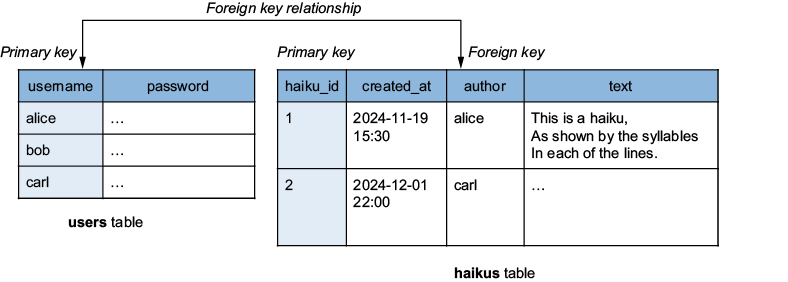
Use the database schema diagram to see the users and haikus tables and their foreign-key relationship before writing SQL. section 8.2.2
A schema supports the CRUD cycle: creating, reading, updating, and deleting records. SQL implements these operations, while commands such as \dt help verify that tables exist. In production, keep authentication data as password hashes rather than plain-text passwords. section 8.7 section 8.2.4











































