An API is the interface an application uses to request another system’s capabilities. For an LLM application, that might mean sending a message to a hosted model rather than deploying the model yourself. This is a fast, inexpensive way to test whether the model works for your use case before making a larger investment. section 1.2.1
Listing 1.1 A simple app calling OpenAI’s API
import os
from openai import OpenAI

client = OpenAI(                       #1
    api_key=os.getenv("OPENAI_API_KEY")         #2
)

chat_completion = client.chat.completions.create(
    model="gpt-3.5-turbo",
    messages=[{"role": "user", "content": "Hello world"}],
)
The Python call shows a minimal request: configure an OpenAI client with an API key, select a model, and send a user message. section 1.2.1
Buying API access also buys access to a provider’s model expertise, safety controls, and supporting systems. The trade-off is dependence on that provider’s rules and continued access. A game built around a hosted LLM faced demands to filter player content or lose access—an operational risk when the API is central to the product. section 1.2.1 section 1.2.2
If you deploy your own LLM, the API becomes the application’s service boundary. Plan it before deployment: decide how requests reach the model, what preprocessing they need, and how the service supports interactive, batch, or streaming work. Batching, rate limiting, and streaming belong in that plan. A service keeps model logic out of each client pipeline, but adds communication latency. section 6.1
Figure 6.1 A basic LLM service. A majority of the logic is handled by the API layer, which will ensure the correct preprocessing of incoming requests is done and serve the actual inference of the request.
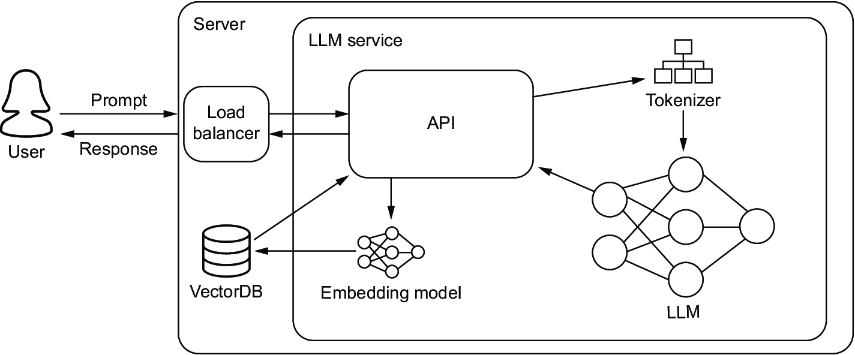
The service diagram locates request preprocessing and inference in the API layer, rather than in each application that uses the model. section 6.1











































