ChatGPT is a conversational way to use GPT, a generative AI model that creates text and programming code from natural-language requests. GPT means generative, pretrained, transformer: it generates new content, learned language and code patterns from large amounts of data, and prioritizes important parts of a request. For web work, it can translate plain-English instructions into HTML, CSS, and JavaScript. section 1.1 section 1.2
Treat ChatGPT as a practical assistant rather than magic. Describe the page you want, then use its response as a draft you can copy into files, test, and improve. It is especially suited to static pages that do not depend on server-stored data; generated code can vary between runs, models, apps, and conversation styles. section 1.5 section 4.3
Figure 1.4 A simplified diagram of the process you use to get ChatGPT to help you create a web page
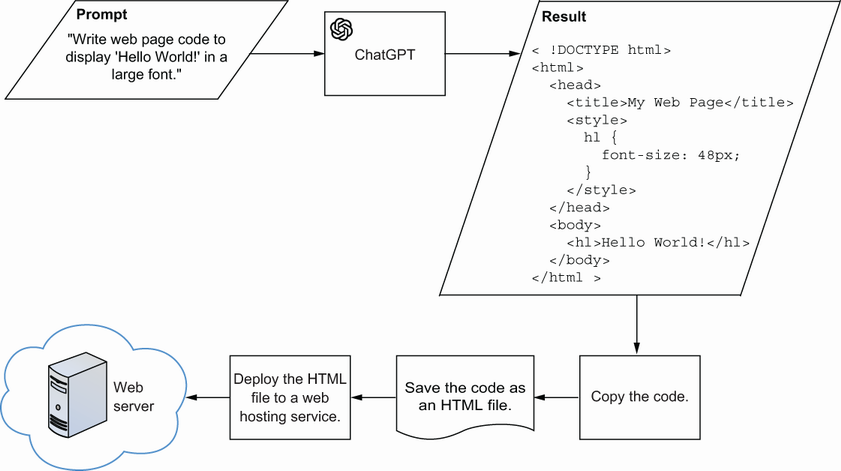
Use the page-building cycle as a checklist: ask for code, copy it into a file, save it, deploy it, then return to the prompt when the result needs work. section 1.4 section 1.5
A useful prompt states the details ChatGPT needs to produce a focused result:
- Goal: say what you want generated, such as a complete web page. section 2.2
- Data: name any content the page should store or display. section 2.2
- Action: specify what the page should do with that content. section 2.2
- Interface: describe how a visitor starts or uses the action. section 2.2
Generate a small interactive page
Prompt: “Create web page code that stores 50 puns and displays a random pun each time the user clicks a button.” This request gives ChatGPT a goal, data, an action, and a button-based interface. For larger pages, request HTML, CSS, and JavaScript separately when needed, and name the files they should connect to. section 10.6
Check every result before relying on it. A strong prompt usually improves the response, but even a good prompt can produce unusable or odd code. Ask whether the output matches the request, test it by pasting it into a web-code testing site, and refine the prompt for missing features or revise it to fix errors. section 1.4.1 section 1.4.6
ChatGPT can also assist with site content. Use it to brainstorm post ideas, research a topic, draft text, or suggest improvements to writing. When researching, a web-connected version can provide links for fact-checking; treat generated ideas and research as starting points to develop and verify. section 7.2 section 7.2.3



















