ChatGPT is a conversational service for interacting with OpenAI language models. Enter a request in everyday language, read the reply, and ask follow-up questions when you need a correction or a different result. It can help with data analysis, but its answers can be wrong. section 2.2 section 2.5
To get started, create or use an OpenAI account and sign in through the ChatGPT web interface. A free account is sufficient for the examples here. Type into the input field to begin; use New Chat when you want to leave earlier dialogue behind. Available models and request limits may depend on your subscription. section 2.1 section 2.2
For data analysis, choose how ChatGPT will contribute:
- Process text directly: provide the text and a clear task. For product reviews, ask it to classify satisfaction, extract particular details, or write a summary to your specifications. section 2.3 section 2.5
- Use a data-processing tool for larger or structured data: describe the data, task, and desired output so ChatGPT can generate code for the tool to run. This avoids asking the language model to process a large dataset directly. section 2.4 section 2.5
Count reviews by category
Upload a CSV table of reviews with columns for review ID, satisfaction, and product category. Ask, “How many reviews do we have for each product category?” ChatGPT can return a table of counts. In this workflow, it generates and executes Python code to analyze the uploaded data; inspect that code with Show Analysis rather than trusting the answer blindly. section 2.4 section 2.4.1
Figure 2.5 Answer generated by ChatGPT for a question about the input table. Click the Show Analysis button to see how ChatGPT determined the answer.
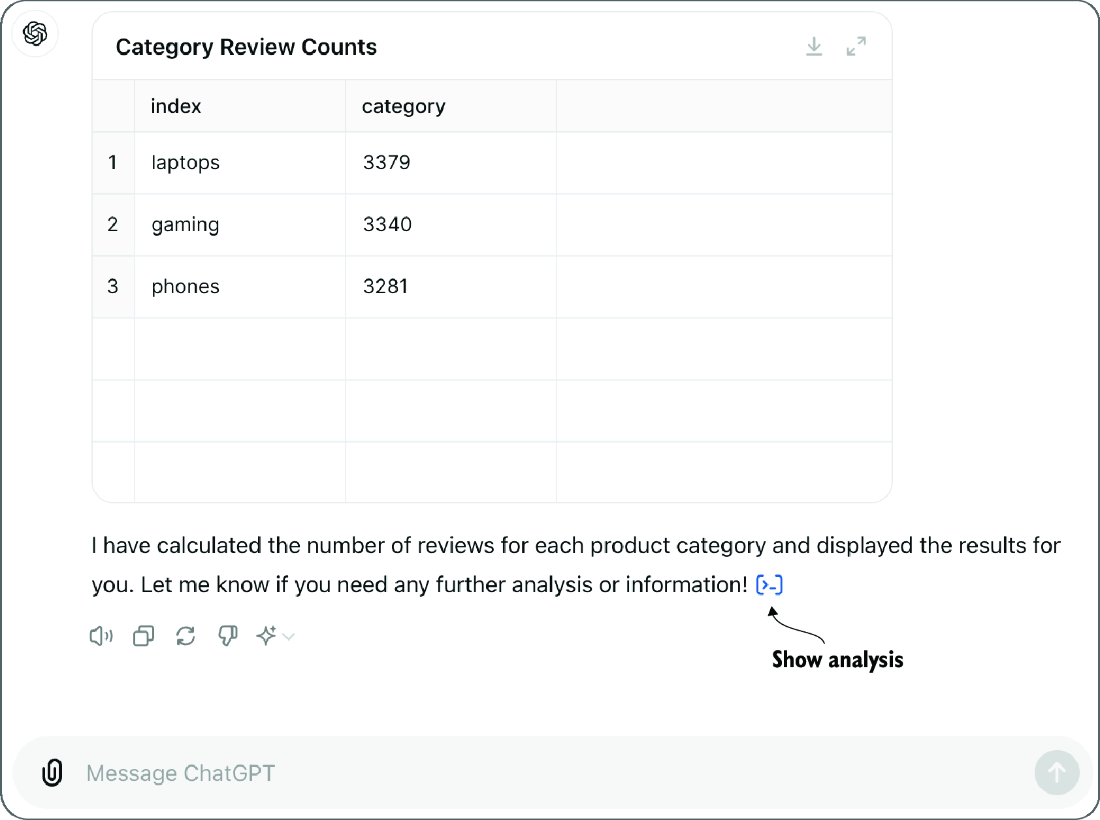
The example answer shows the category counts and where to open Show Analysis to inspect how they were calculated. section 2.4.1



















