Data exploration, or exploratory data analysis (EDA), is a systematic look at a dataset’s characteristics before committing to an analysis or model. It helps reveal patterns, unusual records, and limitations that the original question may not have anticipated. section 2.1.3 section 9.4
A practical first pass asks:
- What do histograms or boxplots show about each measure’s distribution? Are extreme values legitimate, and what would justify removing them? section 2.1.3
- How many records have missing or duplicate values? Is missingness expected, and should affected values be retained, imputed, or removed? section 2.1.3
- What do the count, number of unique values, mean, median, standard deviation, minimum, and maximum reveal? section 2.1.3
- Do plots of variables together suggest useful predictors, derived variables, or transformations for the planned model? section 9.2.1 section 9.4
Exploring a forecasting dataset
To forecast rat-sighting complaints for staffing decisions, hotline records are filtered and counted by day, then combined with daily weather data. The daily grain matches the proposed decision; an agency needing hourly forecasts would need a different grain. Month and day-of-week variables allow comparisons of sighting distributions, while correlations and pairplots help inspect relationships with candidate predictors. These checks inform feature choices rather than proving that a predictor will improve a model. section 9.2.1
Figure 9.22 Boxplots showing the median and distributions of rat sightings for each month
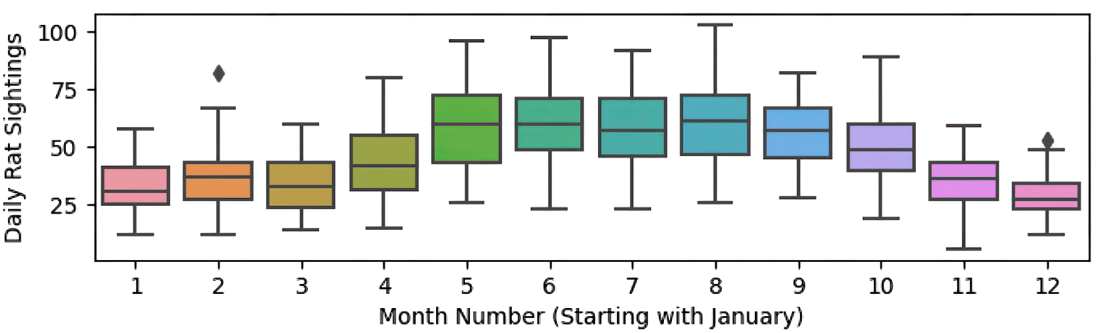
Monthly boxplots make the median and spread of daily rat sightings visible before month is used as a modeling variable. section 9.2.1
Exploration should remain visible in the deliverable. Record the steps behind charts and summary tables, explain aggregation choices, and label displays clearly. For example, daily Help Center views and chat requests can be summarized over 90-day periods when daily volume is the established metric, while customer-satisfaction summaries must respect the absence of more granular data. Exploration informs later statistical tests and model-assumption checks; it does not replace them. section 2.3.2 section 9.4












