Need to persist and retrieve task data? SQL provides the statements used to create a table and query records in an SQLite database connected through Python’s built-in sqlite3 module. section 14.3.1 section 14.3.2
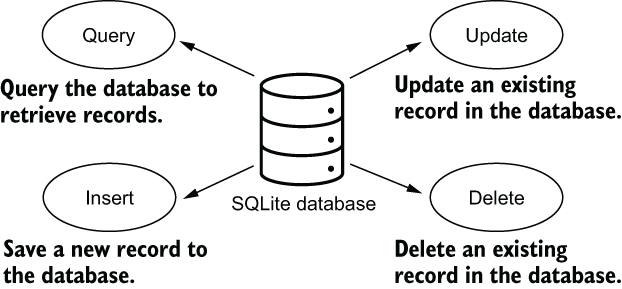
The database workflow centers on four operations:
- Query retrieves records. section 14.3.1
- Insert saves a new record. section 14.3.1
- Update changes an existing record. section 14.3.1
- Delete removes a record. section 14.3.1
@classmethod
def create_sqlite_database(cls):
    """Create the SQLite database
    """
    with sqlite3.connect(TaskierDBOption.DB_SQLITE.value) as con:
        cls.con = con                                              #1
        cursor = con.cursor()
        cursor.execute("CREATE TABLE task (task_id text, title text,
 desc text, urgency integer, status integer, completion_note text);")
Creates an SQLite database connection, opens a cursor, and executes a CREATE TABLE statement for task fields. section 14.3.1
Filtering tasks with a SQL query
A task loader builds a SELECT statement that filters records by status and urgency. When content is supplied, LIKE adds substring matching across the completion note, description, and title. fetchall returns tuples, which are converted into Task objects. section 14.3.2
Listing 14.6 Loading data from the SQLite database
@classmethod
def load_tasks(cls, statuses: list[TaskStatus]=None,
 urgencies: list[int]=None, content: str=""):
   """The docstring as before
   """
   tasks = list()
   if app_db == TaskierDBOption.DB_CSV.value:
       # csv-related code from listing 14.3
       pass
   else:
       with cls.con as con:
           if statuses is None:
               statuses = tuple(map(int, TaskStatus))
           else:
               statuses = tuple(statuses) * 2
           if urgencies is None:
               urgencies = tuple(range(1, 6))
           else:
               urgencies = tuple(urgencies) * 2
           sql_stmt = f"SELECT * FROM task WHERE status in {statuses}
 and urgency in {urgencies}"
           if content:
               sql_stmt += f" and ((completion_note LIKE '%{content}%')
 or (desc LIKE '%{content}%') or (title LIKE
 '%{content}%'))"
           cursor = con.cursor()
           cursor.execute(sql_stmt)
           tasks_tuple = cursor.fetchall()
           tasks = [Task(*x) for x in tasks_tuple]
   return tasks
Shows the load_tasks implementation, including optional status, urgency, and content filters and conversion of retrieved rows into task instances. section 14.3.2
Figure 14.5 Common operations with an SQLite database: query, insert, update, and delete. Query retrieves records from the database, insert saves a new record to the database, update updates an existing record, and delete removes an existing record.
Summarizes query, insert, update, and delete as the common operations performed with an SQLite database. section 14.3.1
























