A vector database stores vector representations of content so an application can retrieve relevant material for a query. In retrieval-augmented generation (RAG), it acts as an external knowledge source: retrieved facts are supplied to an LLM, which uses them when generating a response. section 7.4.2 section 7.6
A practical workflow starts with source content rather than a model prompt alone. Load a document, split its text into manageable chunks, represent those chunks as vectors, and store them in a collection. A retriever can then query the collection and pass returned context into a question-answering chain. section 7.4.2
In a product-information RAG system, the vector database supports these stages:
- Load the product HTML page into documents. section 7.4.2
- Split documents into overlapping text chunks before storage. section 7.4.2
- Create OpenAI embeddings and persist the chunks in a Chroma collection. section 7.4.2
- Expose the collection as a retriever for a LangChain RetrievalQA application. section 7.4.2
- Constrain the prompt to answer from retrieved context and admit when the context is insufficient. section 7.4.2
Answering questions about a smartphone
Store chunks from a New SmartX 2023 product page in Chroma, then ask for a 30-word description. The retrieval chain returns a description grounded in product details and includes the source documents used as context. section 7.4.2
This pattern is useful when an LLM needs current or topic-specific context, such as product details, real-time data, customer reviews, or other relevant information. It can support ad hoc commentaries and annotations for data storytelling without relying only on the model's existing knowledge. section 7.4.2 section 7.6
Figure 7.13 A RAG-based system
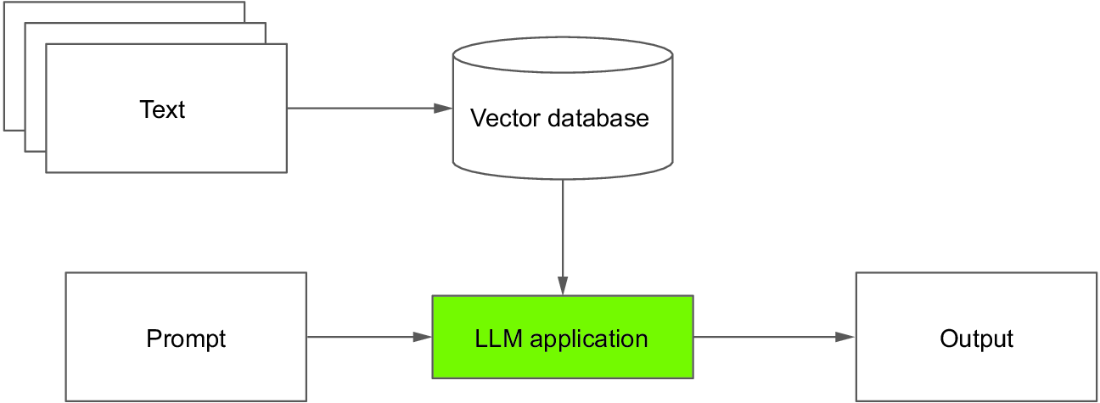
The architecture diagram situates the vector database between prepared source content and the LLM application that queries it. section 7.4.2

























