A customer-support chatbot needs company information that its language model may not know. A vector database lets the app search a private knowledge base for relevant passages, then pass those passages to the model with the customer’s question. This is the retrieval step in retrieval-augmented generation (RAG). section 10.1.3 section 10.5.1
The search relies on embeddings: lists of numbers representing content so it can be compared by similarity. Imagine rating movies on two scales, comedic value and explosions per hour. A movie rated [1.2, 6] becomes a two-number vector; nearby ratings suggest similar movies. For the chatbot, the items being compared are pieces of text rather than movies. section 10.5.1 section 10.7
Figure 10.15 Converting movies into vectors and plotting them on a chart.
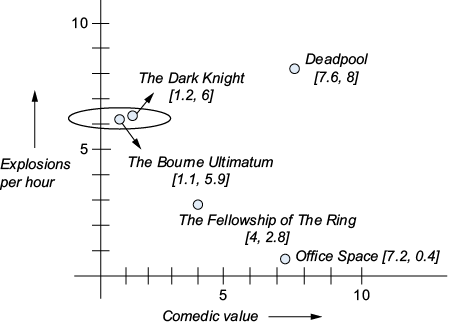
The movie chart makes similarity search concrete: each pair of ratings places a movie on a chart where comparable items can be found. section 10.5.1
A practical setup for a support-article knowledge base has three parts:
- Create a Pinecone index to hold article chunks and their embeddings. Configure it for the chosen embedding model and a similarity metric; the demonstrated setup uses text-embedding-3-small, 1,536 dimensions, and cosine similarity. section 10.5.2
- Load the text articles, split them into chunks, and add the chunks to the vector store. The example splits at 1,000 characters with 200 characters of overlap. section 10.5.2
- Search with the customer’s query. Add the returned passages to the chatbot’s system message before it generates an answer; if the information is insufficient, direct the customer to a human representative. section 10.5.2
Answering a pen-care question
A support article says to flush fountain-pen nibs with warm water every few weeks and store pens upright. After that article is ingested, a question about pen maintenance can retrieve relevant chunks for the chatbot to use in its answer. section 10.5.2
Listing 10.8 The VectorStore class in vector_store.py
from pinecone import Pinecone
from langchain_openai import OpenAIEmbeddings
from langchain_pinecone import PineconeVectorStore
from langchain_community.document_loaders import DirectoryLoader, TextLoader
from langchain.text_splitter import RecursiveCharacterTextSplitter

class VectorStore:
  def __init__(self, api_keys, index_name, model_name):
    pc = Pinecone(api_key=api_keys["VECTOR_STORE_API_KEY"])
    embeddings = OpenAIEmbeddings(
      api_key=api_keys["OPENAI_API_KEY"], model=model_name)
    index = pc.Index(index_name)
    self.store = PineconeVectorStore(index=index, embedding=embeddings)

  def ingest_folder(self, folder_path):
    loader = DirectoryLoader(
      folder_path,
      glob="**/*.txt",
      loader_cls=TextLoader
    )
    documents = loader.load()
    splitter = RecursiveCharacterTextSplitter(
      chunk_size=1000,
      chunk_overlap=200
    )
    texts = splitter.split_documents(documents)
    self.store.add_documents(texts)

  def retrieve(self, query):
    return self.store.similarity_search(query)
The Python VectorStore class connects Pinecone to an embedding model and groups folder ingestion and query retrieval behind two methods. section 10.5.2
The vector database finds candidate context; it does not answer the customer by itself. Keep its index name and API key in app configuration, and check that ingestion populated the index before relying on retrieval. section 10.5.2

























