A vector database stores document chunks alongside numerical vector representations called embeddings, then retrieves chunks whose vectors are closest to a query. In retrieval-augmented generation (RAG), the application adds the returned chunks to the prompt as focused context instead of stuffing entire documents into it. section 4.1 section 4.2
A practical vector-database workflow consists of these stages:
- Load source files with a document reader and split them into smaller chunks with a text splitter. section 4.3
- Generate embeddings for each chunk and write the chunks to the vector database. section 4.1
- Embed a user question, search for nearby vectors, and return the most similar chunks. section 4.2
- Filter results with metadata such as a normalized game title, and tune Top-K or the similarity threshold when needed. section 4.4.1
- Pass the selected chunks into the prompt, balancing relevant context against token usage and request cost. section 4.4.1
Cosine similarity or distance can measure how close query and document vectors are, but embedding APIs or libraries calculate the vectors and the vector database handles the comparison. The application mainly chooses a store, configures it, and submits searches. section 4.2
Board-game rules with Qdrant
A Spring Boot loader watches a drop-off directory, accepts PDF, Word, or text files, reads them with Tika, splits them into chunks, determines a game title, and writes the results to Qdrant. A game-rules service then searches Qdrant for chunks matching both the user’s question and the selected game. A sample load produces two chunks, which can be verified through Qdrant’s collections and points-count endpoints. section 4.3.2 section 4.3.4 section 4.4.1
Figure 4.1 RAG involves finding documents relevant to the question and adding them as context in the prompt.
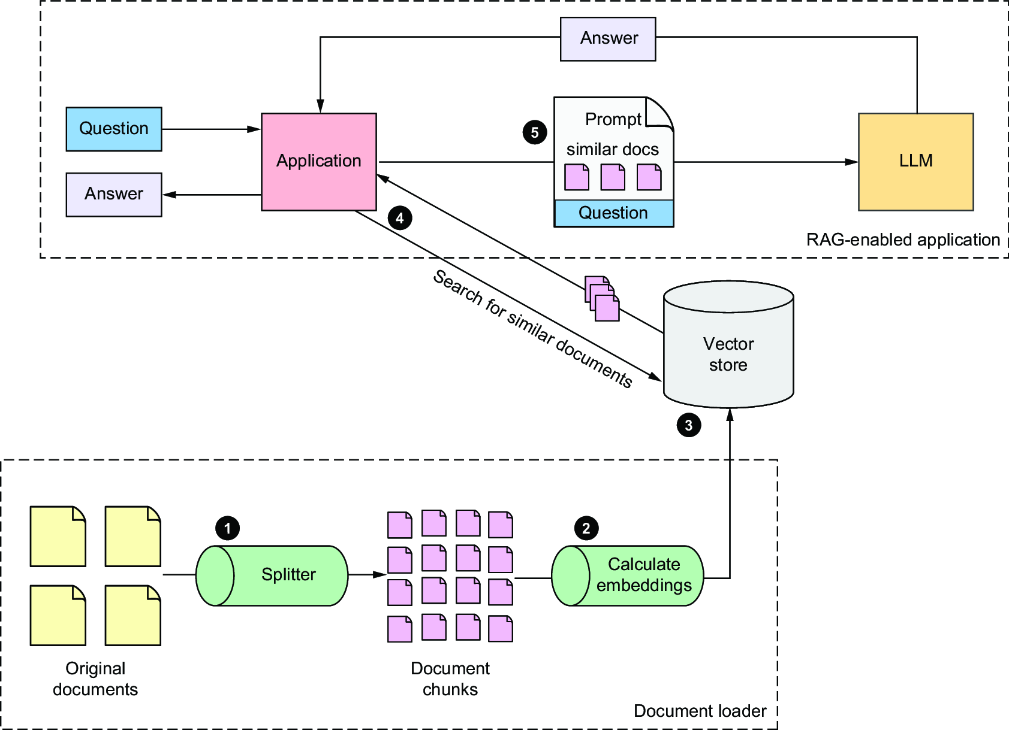
Use the RAG flow diagram to trace document chunking, embedding, vector lookup, and prompt-context assembly. section 4.1
Listing 4.2 Implementing RAG in GameRulesService
package com.example.boardgamebuddy;

import org.springframework.ai.document.Document;
import org.springframework.ai.vectorstore.SearchRequest;
import org.springframework.ai.vectorstore.VectorStore;
import org.springframework.ai.vectorstore.filter.FilterExpressionBuilder;
import org.springframework.stereotype.Service;

import java.util.List;
import java.util.stream.Collectors;

@Service
public class GameRulesService {

  private final VectorStore vectorStore;

  public GameRulesService(VectorStore vectorStore) {
    this.vectorStore = vectorStore;
  }

  public String getRulesFor(String gameName, String question) {
    var searchRequest = SearchRequest
        .builder()
        .query(question)
        .filterExpression(
            new FilterExpressionBuilder()
                .eq("gameTitle", normalizeGameTitle(gameName)).build())
        .build();  #1

    System.err.println("Search request: " + searchRequest);

    var similarDocs =
        vectorStore.similaritySearch(searchRequest);  #2

    if (similarDocs.isEmpty()) {
      return "The rules for " + gameName + " are not available.";
    }

    return similarDocs.stream()
        .map(Document::getText)
        .collect(Collectors.joining(System.lineSeparator()));  #3
  }

  private String normalizeGameTitle(String gameTitle) {   #4
    return gameTitle.toLowerCase().replace(" ", "_");
  }

}
Inspect the Java service pattern for injecting VectorStore, building a filtered SearchRequest, and collecting matching document chunks. section 4.4.1

























