A chatbot user asks, “Can I take ibuprofen with my blood pressure medication? My arms are sore after getting the vaccine.” Keyword search may reduce that question to a few terms and lose its nuance. A vector database offers a way to find passages by meaning rather than exact wording. It returns relevant material; it does not, by itself, give the user a cohesive answer. section 6.1.3
In a retrieval-augmented generation (RAG) workflow, the store connects document preparation to the user’s question:
- Split documents into passages, or chunks. An embedding model converts each chunk into a numerical vector; the vector database stores and indexes it. section 6.3.2
- Convert the user’s question with the same embedding model. Search for similar vectors, then retrieve the matching passages. section 6.3.2
- Pass those passages to an LLM to synthesize a response. Retrieved context helps focus the answer, but its quality depends on what the search finds. section 6.3.2 section 6.5.1
Figure 6.9 RAG uses a vector database during build time and run time.
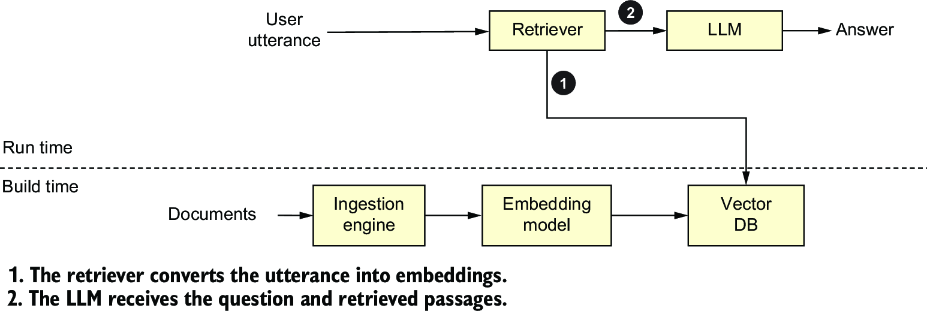
The diagram separates build-time indexing from run-time retrieval, showing where the vector database serves each stage. section 6.3.2
Finding support context
Suppose a customer-support chatbot needs several passages to answer a device-overheating question. A vector search can retrieve related troubleshooting information even when wording differs. If it misses a crucial passage, the resulting answer may be inadequate; check recall as well as response speed. section 6.5.1 section 6.1.3
Choose a vector store for the size of your data and the performance, functionality, and cost you need. Chroma is one example; FAISS supports fast similarity search, and some traditional search systems offer vector-search plugins. Curate duplicate documents, then measure indexing speed, storage, retrieval latency, and recall. A fast search that misses relevant passages is not a good result. section 6.4.4 section 6.5.1

























