A vector database stores and searches numerical embeddings: representations of text or other content as points in a multidimensional space. Rather than looking only for exact matches, it retrieves nearby points to find similar content. This makes it useful for semantic search, recommendations, and retrieving context for AI-generated answers. section 12.1.2
Figure 12.2 Vector database operations. Data is processed by an embedding model, transforming it into vector embeddings such as [1.45, ..., 1.01, 0.89, 0.06]. These embeddings are stored in a vector database. Queries from the application are also transformed into embeddings before the database is searched. The most relevant results based on these query embeddings are then retrieved and returned as query results. (Image © MongoDB 2024 CC BY-NC-SA 3.0)
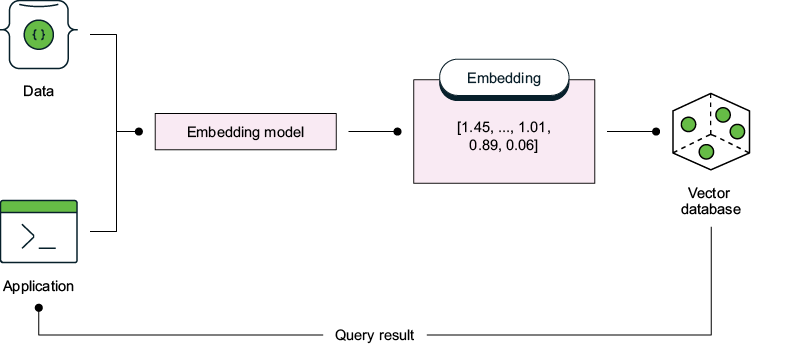
Follow both paths in the diagram: an embedding model converts stored content into vectors, then converts a query into a vector so the database can return similar results. section 12.1.2
To put similarity search to work:
- Convert content to embeddings and store them. A vector index organizes the embeddings for efficient retrieval; it is distinct from the database that holds the data. section 12.1.2 section 12.8
- Embed each query with the same model used for the stored data. Text alone is not a query vector. section 12.3.1
- Search for nearby vectors and return the matching content. Similarity can be measured with cosine similarity or Euclidean distance; an index can use approximate nearest-neighbor search for efficient retrieval. section 12.1.2 section 12.8
Searching movie plots in Atlas
Store plot embeddings in the plot_embedding field and create an Atlas Vector Search index. For a query such as “village life,” supply its embedding to the $vectorSearch aggregation stage. Set index to the vector index name, path to plot_embedding, queryVector to the numerical query embedding, numCandidates to the candidate count, and limit to the desired result count. Check the index name and field path: the search depends on both, as well as a compatible query embedding. At the time described, embedding generation required an external system rather than an Atlas-provided text-to-embedding model. section 12.3.1
db.embedded_movies.aggregate([
  {
    "$vectorSearch": {
      "index": "MongoDB-in-Action-VectorSearchIndex",
➥// #1
      "path": "plot_embedding", // #2
      "queryVector": [<array-of-numbers>], // #3
      "numCandidates": <number-of-candidates>, // #4
      "exact": false, // #5
      "limit": <number-of-results> // #6
    }
  }
])
Use this pipeline outline to locate the required $vectorSearch inputs; replace its placeholders with an index name, an embedding array, and search limits. section 12.3.1
In retrieval-augmented generation (RAG), documents are split into chunks, embedded, and stored for later search. A user question is embedded and matched to relevant chunks; those chunks then provide context for a language model’s answer. One chatbot setup uses Atlas Vector Search to retrieve embeddings of prevalidated MongoDB documentation from a PDF, with LangChain coordinating retrieval and GPT-4 generating the response. The database supplies relevant context; the language model still generates the answer. section 14.1 section 14.4

























