A context window is the maximum amount of tokenized information a model can handle in one interaction. Prompts, replies, and tool results all add to the conversation’s running context; research that loads web pages or files can make it grow quickly. When a session approaches its limit, it may stop, though Claude Code can summarize and compress context to continue. section 1.4.1
Use context size as one consideration when working with Claude:
- Start a new session with the problem, relevant files, architecture decisions, and constraints; previous conversation context does not normally carry over. section 1.4.1
- Choose a model to fit the task and usage limits: Sonnet is a day-to-day option, Opus suits complex reasoning over large inputs, and Haiku suits simple tasks. section 1.4.2
Research can expand context quickly
A web-research turn that searches and loads pages can add thousands of tokens. Repeated tool results accumulate alongside prompts and replies, so a long session can approach its context limit. section 1.4.1
Figure 1.2 How context builds over the turns of a conversation. The input grows cumulatively and there can be huge jumps from tool use when Claude is researching file content or web pages.
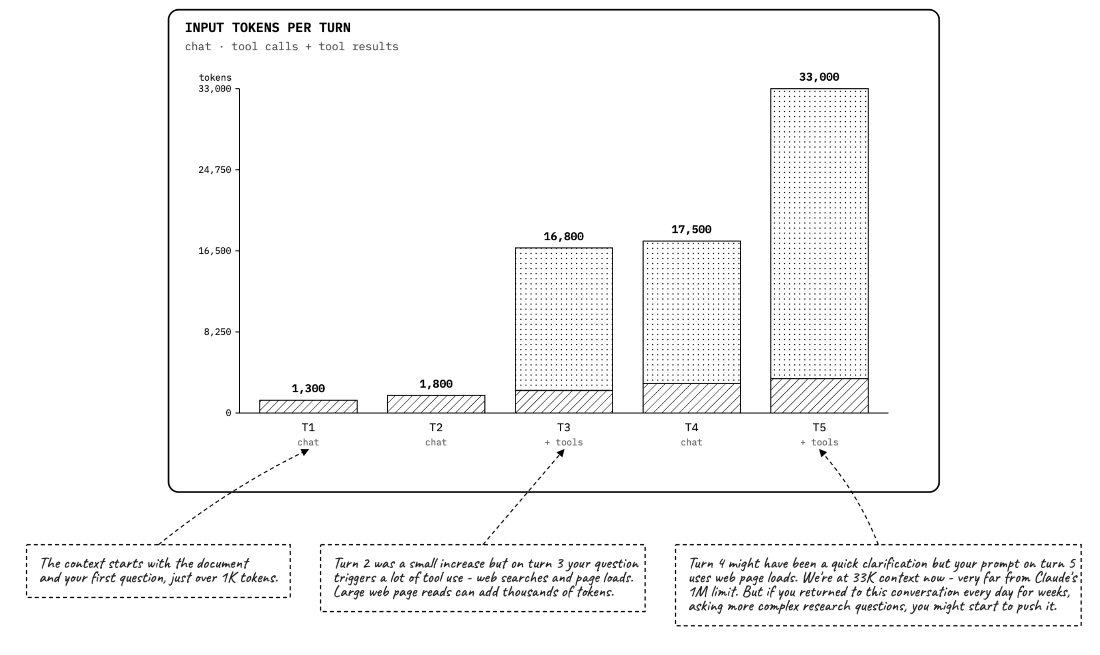
The figure illustrates how conversation context accumulates across turns, with large increases when tools load files or web pages. section 1.4.1