A context window is the finite token capacity available to a language model at one time. Your question, pasted code, tool results, and requested answer all compete for that capacity. As the window fills, irrelevant code crowds out reasoning, and answers can degrade before the hard limit is reached. section 2.0 section 2.2
Use the window as a budget rather than assuming that more input produces better understanding:
- Match scope to the question: inspect one file for local internals, the whole pipeline for end-to-end behavior, and infrastructure files for deployment questions. section 2.2
- Expect breadth and depth to trade off: a single call cannot provide a useful high-level map and a detailed explanation of every component. section 3.3
- Remove noise before adding complexity; tests, documentation, examples, localization, media, lock files, and vendored code can dominate a repository without clarifying its architecture. section 3.2.1 section 3.2.2
- Treat an agent's shared window differently from a workflow's fresh windows: every search, file read, dead end, and backtrack consumes the agent's capacity to reason. section 4.0
From repository dump to focused investigation
A 19-file nanoGPT repository can be serialized into roughly 19,000 tokens and pasted into a large model. A 500-file backend may overflow the window or produce weaker answers as irrelevant files accumulate. First measure the repository, then mechanically skip tests, lock files, and oversized files. If it remains too large, send short previews containing imports, class definitions, and docstrings; let the model select relevant files; fetch only those files in full. Finally, use separate calls for an overview and for each component rather than asking for one exhaustive explanation. section 2.2 section 3.2.2 section 3.3
Figure 2.2 Paste the files relevant to your question. A question about a single file's internals needs only that file. An end-to-end question needs the whole pipeline. A deployment question needs infrastructure files.
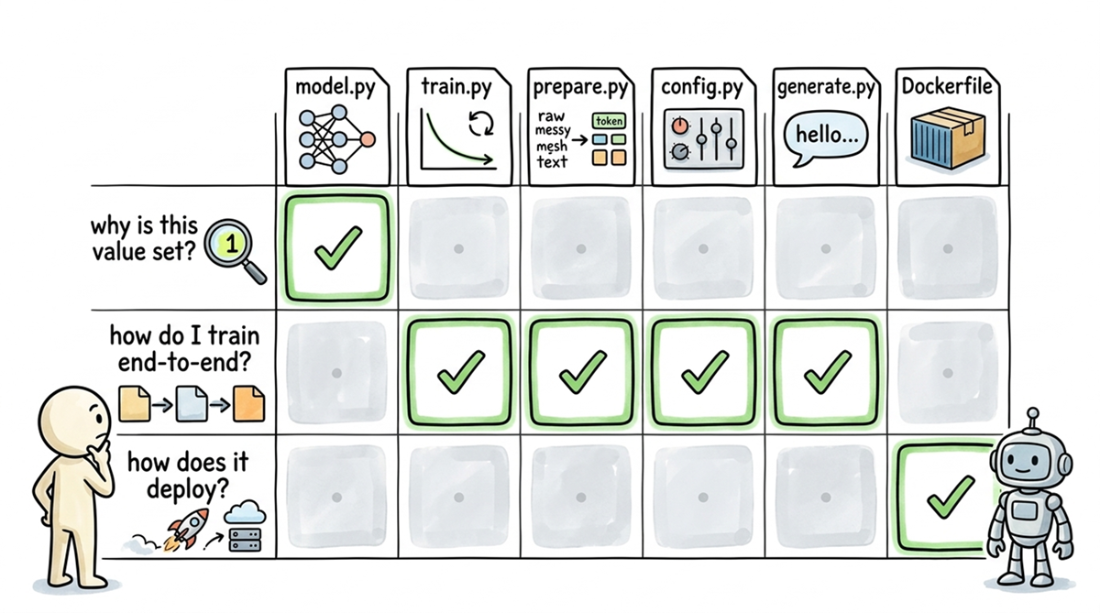
Compare how much code belongs in the window for local, end-to-end, and deployment questions. section 2.2