A deployment pipeline automates the route from a code change to deployed software. Once reviewed code is merged, it can be compiled, tested, and deployed, with failures flagged for resolution. This helps teams build consistently without relying on one person or machine. section 9.5
Consider both reliable delivery and the security of the process:
- Automate builds and deployments so release capability does not depend on a particular person being available. section 9.5
- Protect the build environment, restrict version-control access, and lock third-party library versions until upgrades are validated. section 12.7.2
- Watch for unexplained changes in deployment size, which may indicate unexpected code or dependencies. section 12.7.2
When a build depends on one machine
A company’s build failed after its only build machine received updated .NET libraries, preventing updates to its core product. A virtualized environment offered a short-term way to make builds more accessible and predictable. The longer-term goal is to build and deploy without depending on one person or machine. section 9.5
A compromised build process
The SolarWinds attack illustrates how malicious code introduced into shared software can reach many organizations through normal updates. Separate build environments, locked dependency versions, and attention to unexpected file-size changes are among the proposed protections. section 12.7.2
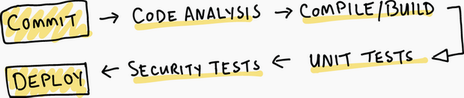
Use the pipeline diagram to follow the typical CI/CD flow. section 9.5





























