A developer can compile and deploy an application by hand, but repeated manual handoffs make delivery less predictable. A deployment pipeline moves committed code through predefined, automated steps: check its quality, build a product, and deliver it for use. Think of an assembly line that turns source code into a library, a device update, or software running on a server. section 2.3 section 1.1
Figure 1.3 Code is moved along a pipeline where it is analyzed, built, and then shipped as a library to a device or a server.
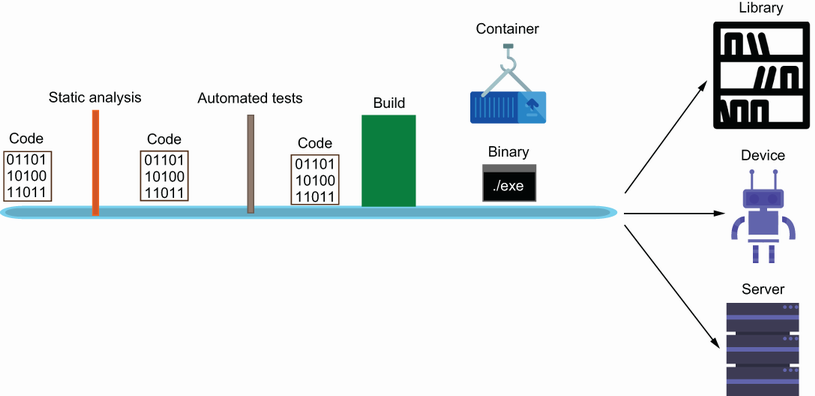
Follow the code from analysis and build to the different forms in which it can be shipped. section 1.1
Start small, then add checks and delivery steps as the product needs them:
- Make the project reproducible with documented setup and build commands, so contributors and automation can follow the same instructions. section 2.2
- Trigger the pipeline when code is checked in. Automated processes can report a failed quality assessment or compilation, giving the developer a chance to fix it. section 1.2.1
- Define jobs and steps for the work required now. A CI system can begin with a simple artifact and grow to include quality checks and deployments. section 2.3
A first GitHub Actions pipeline
A YAML workflow runs on pushes to `main`. Its build job sets up Go, checks out the repository, runs `make build`, copies the resulting `api` binary into an artifacts directory, and uploads it as a repository artifact. This establishes automated building and handoff; uploading the artifact is not yet a deployment to a running server. section 2.3
Listing 2.4 pipeline.yml
name: CI Checks

on:
  push:
    branches:                                                #1
      - main
jobs:                                                        #2
  build:
    name: Build App
    runs-on: ubuntu-latest                                   #3
    steps:

    - name: Set up Go 1.x                                    #4
      uses: actions/setup-go@v2
      with:
        go-version: ^1.18

    - name: Check out code into the Go module directory      #5
      uses: actions/checkout@v2

    - name: Build
      run: make build                                        #6

    - name: Copy Files                                       #7
      run: |
           mkdir  artifacts
           cp api artifacts/.

    - name: Archive                                          #8
      uses: actions/upload-artifact@v2
      with:
          name: api                                          #9
          path: artifacts
Inspect the workflow definition for its push trigger, job, ordered steps, and artifact upload. section 2.3
The payoff is a shorter feedback loop, not automation for its own sake. A failed step tells a developer what to repair; a successful delivery lets the team gather customer feedback and choose the next small change. Keep the pipeline understandable and extend it as the team’s delivery needs grow. section 1.2.1 section 1.1 section 1.2.2





























