The mean is the arithmetic average: add numeric observations and divide by their count. In distribution charts, it marks a typical value alongside the broader shape of the data. section 6.5
A mean becomes useful when comparing groups. A violin plot can show an entire distribution while placing a dot at each group’s mean, making average values easy to compare without hiding variation. section 6.5 section 6.0
Calculate and use the mean in a D3 visualization:
- Isolate the numeric observations for a group, such as salaries belonging to one role. section 6.5
- Call d3.mean(values) to calculate the group’s average, then store the result with the group’s data. section 6.5
- Use the result as a visual position, such as a dot on a salary axis, and compare it with quartiles or the median. section 6.5
Average salary by role
For each role, filter the dataset to matching records, map the records to salary values, and calculate the average with role["mean"] = d3.mean(role.salaries). Sorting roles by a.mean - b.mean then orders them from the lowest to highest mean salary. section 6.5
Figure 6.17 Violin plots of the salary distribution of the five leading data visualization roles. Each plot is combined with a gray line extending from the first to the third quartile and a white dot positioned at the mean value.
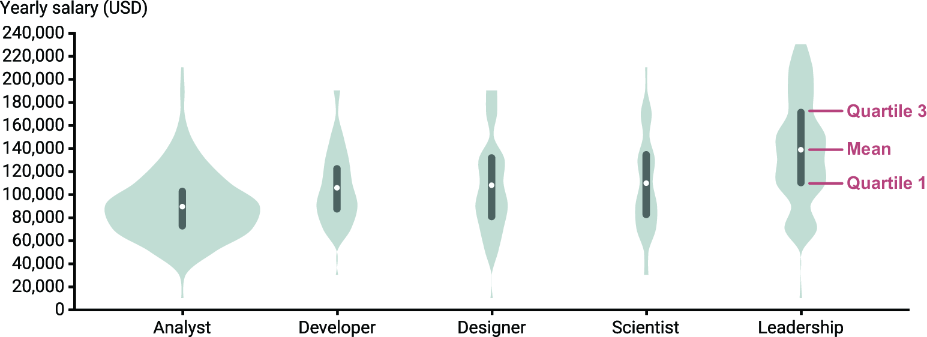
Inspect the violin plots to see mean values represented as dots beside interquartile ranges and complete distributions. section 6.5




























