A trajectory is what an agent tried while carrying out a task: its execution history, not just its final answer. An agent may produce a useful result, but the path to that result matters when you need to understand a mistake or improve the workflow. A trace makes parts of that path inspectable. section 10.2.1 section 2.3.4
Follow the path at three levels:
- Task state: what the agent is trying to do, its candidate strategies, and what has been tried so far. section 10.2.1
- Execution: the order of model calls and tool calls, including tool inputs, outputs, and timing. section 2.4.2
- Assessment: how results are evaluated and whether the agent continues or finishes. section 10.2.1
A two-tool research task
Suppose a research-planning agent first calls get_research_sources(), then uses get_resource_url() for a source it found. The second call depends on the first: this is tool chaining. Inspecting the trace shows the call order and each tool’s inputs and outputs, helping you locate a wrong source choice or a slow step instead of judging only the finished plan. section 2.4.2
Figure 2.9 OpenAI Traces page showing the various tool calls and LLM responses executed by the agent
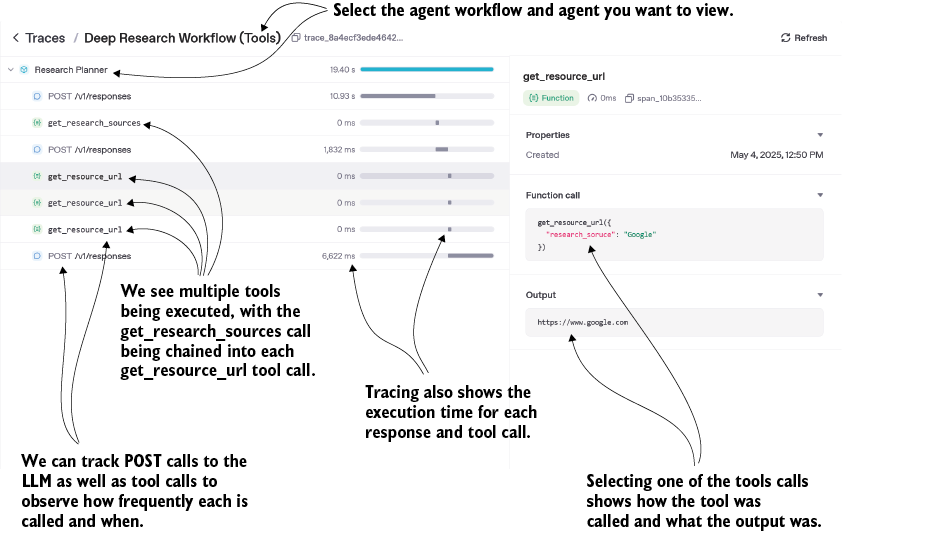
The trace view shows model responses and tool calls along the agent’s execution path. section 2.4.2
For a small OpenAI Agents SDK workflow, wrap the run in a named trace and inspect it in OpenAI Traces. For broader observability, Phoenix can collect traces across agent workflows and expose latency, token usage, sessions, and metrics. In deployed systems, attach identifiers such as session_id, turn_id, and tool_call_id so activity can be found across turns. Keep structured logs too: traces alone may leave gaps in UI or service activity, and logged payloads should have personal information redacted. section 2.3.4 section 8.3.6