A trajectory is the execution history of a workflow: the decisions it made, the steps it took, and the intermediate states it produced. The final answer alone cannot show whether a research workflow searched again because its first results were insufficient, or which agent handled a customer request. section 5.6 section 12.4
There are two practical ways to inspect that history:
- In a LangGraph workflow, typed state accumulates across nodes, while conditional edges determine the next step. Preserved execution history lets you inspect a reasoning path, replay from a checkpoint, or branch from an earlier decision. section 5.6
- In LangSmith, a trace makes an agent run visible through its LLM steps, tool calls, message flow and intermediate states. Enable tracing with a LangSmith API key and tracing configuration, rerun the application, then open its latest trace. section 11.9.3 section 11.9.4
Diagnosing a wrong handoff
Suppose a customer-service router sends a billing question to a support agent. Inspect the trace to see which agent received the query, what tools it called, and where the handoff occurred. Tracking current_agent and agent_history in state also makes the sequence of handlers visible. section 12.4
Figure 11.4 LangSmith agent execution trace. This trace visualizes each step of the agent’s workflow—including LLM calls, tool invocations, and message flow—when answering the prompt, “Suggest two Cornwall beach towns with nice weather.”
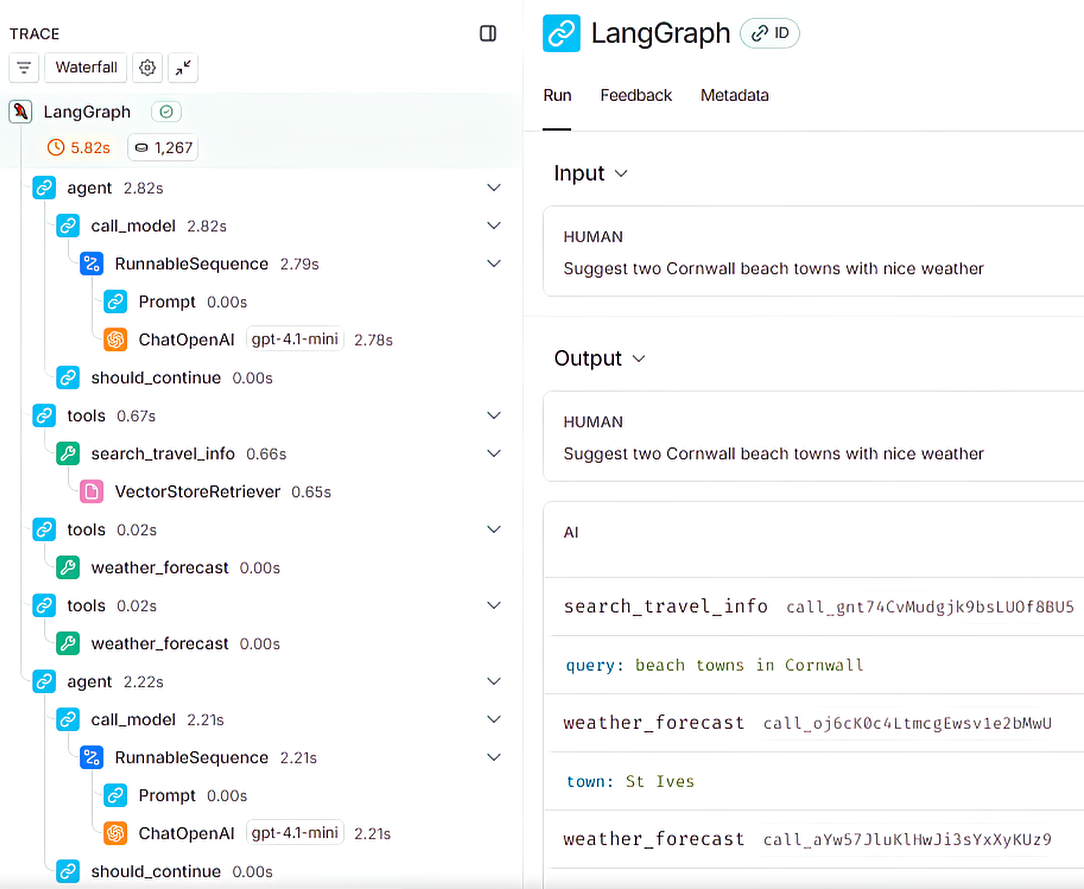
The graphical agent trace provides a concrete view of LLM calls, tool invocations and message flow during one response. section 11.9.4