Distributed tracing records events associated with an individual request as it crosses applications, APIs, and processes. A correlation ID joins those events, making the request’s path visible when a problem cannot be understood from one component alone. section 5.1.1
Use tracing alongside the other core observability signals:
- Metrics show what happened and can trigger an alert, such as a rise in HTTP errors. section 5.1.1
- Logs record discrete events, such as an API request and its result, to help explain how the system reached that state. section 5.1.1
- Traces connect events belonging to one request across processes, helping explain why a cross-component failure occurred. section 5.1.1
Investigating an API failure
Suppose an HTTP-error metric signals a problem and a log records an unsuccessful call to another API. Follow the request’s correlated trace to inspect its execution across process boundaries, rather than treating either signal as the whole story. section 5.1.1
Make tracing part of the platform from the start: instrument code to emit tracing data, collect it reliably, and give developers access to query it. An observability platform can ingest traces through a dedicated pipeline, correlate them for distributed tracing, and expose them alongside metrics and logs. One implementation uses Tempo for trace storage and Grafana for querying and visualization. Treat this as an evolving capability: tracing helps resolve unexpected problems, while developers need the skills and self-service access to use its data. section 5.1.3 section 5.1.4 section 8.2.1 section 5.3.1
Figure 5.1 Components of observability go beyond metrics to include logs and traces. These can be used to show what is happening in the system, why it happened, and how it got into its current state. Metrics and logs are typically used to trigger alerts, but correlating all three types can result in powerful insights into the system state.
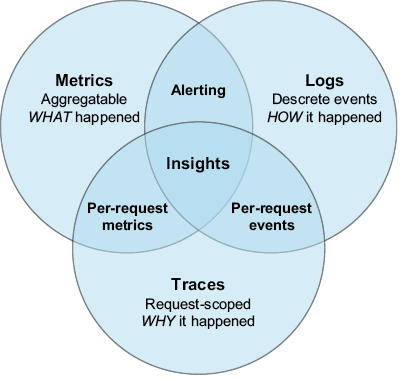
Compare the distinct diagnostic roles of metrics, logs, and traces, then consider how correlating them gives a fuller view of system state. section 5.1.1