A virtual machine (VM) is an isolated software-based computer that allows a complete operating system and its applications to run on shared physical server hardware. VMs solve the inefficiency of dedicating one powerful server to one operating system by consolidating multiple operating systems on a single host. section 17.1 section 17.1.1
A hypervisor, also called a virtual machine monitor (VMM), sits between the hardware and VMs. It allocates CPU, RAM, and storage to each VM. A type 1 hypervisor runs directly on hardware and is common in data centers; a type 2 hypervisor runs as an application on a host operating system and is common for development, testing, and education. section 17.1.1 section 17.4
Key operational characteristics include:
- Each VM runs its own guest operating system and behaves as an independent host on the network. section 17.4
- A VM uses a virtual network interface card (vNIC) rather than a physical NIC. section 17.4
- A virtual switch forwards frames between VM vNICs and the host's physical NICs; its ports can operate in access or trunk mode for VLAN segmentation. section 17.4 section 17.1.1
- Type 1 hypervisors use hardware more efficiently, while type 2 hypervisors are easier to install and use. section 17.1.1 section 17.4
Virtual machines in cloud infrastructure
Infrastructure as a Service (IaaS) lets customers create VMs, choose their operating systems, customize CPU, RAM, and storage, run applications, and connect the VMs into a virtual network. AWS EC2, Azure Virtual Machines, and Google Compute Engine are examples. section 17.3.2
Figure 17.6 VMs connect to each other and the external physical network via a virtual switch. VMs are often segmented into separate VLANs, requiring trunk links.
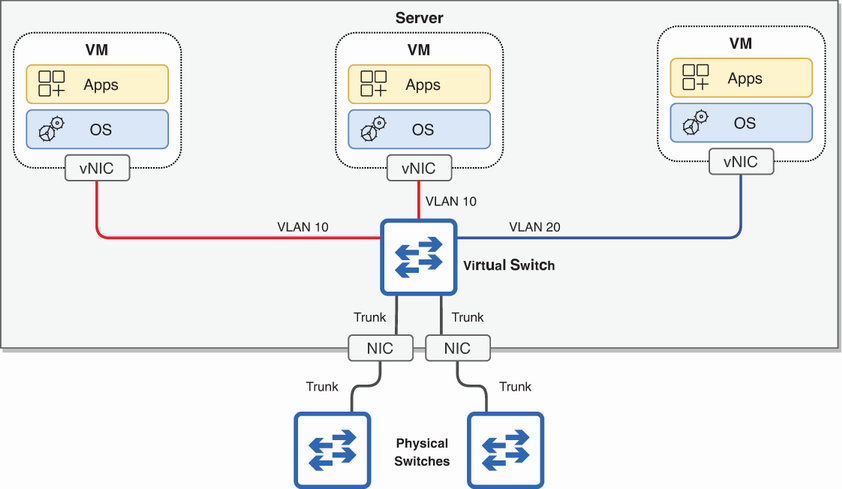
Shows how VMs connect through a virtual switch to one another and to the external physical network, including VLAN access and trunk segmentation. section 17.1.1















