A virtual machine abstracts a physical computer so one physical host can be divided into several independent computing environments. This replaced the wasteful model in which each application required its own dedicated machine. section 1.2 section 1.3
The abstraction covers physical components such as CPU, memory, disk, networking, and removable media. Each VM runs a distinct operating system with its own kernel, networking stack, and resources, allowing multiple operating systems to share one physical machine. section 1.3
A virtual machine improves infrastructure efficiency, but its boundary remains visible at the application layer:
- Administrators can pack multiple independent VMs onto a single physical host. section 1.2
- Applications remain coupled to their operating systems; running multiple application instances may still require multiple VMs. section 1.3
- Unlike containers, VMs provide their own kernels, networking stacks, and resource ownership rather than relying on process and resource isolation in a shared Linux kernel. section 1.3
From dedicated machines to shared hosts
A financial application and other teams’ applications once ran on separate physical machines with separate operating-system tooling. Virtualization allowed those workloads to run in independent VMs packed onto fewer physical machines. section 1.2
Figure 1.1 This diagram represents Michelle’s world in 2002. The outer box represents physical machines and the operating systems running on them. The inner box represents the applications running on the machines and demonstrates how applications used to be more directly tied to both operating systems and machines.
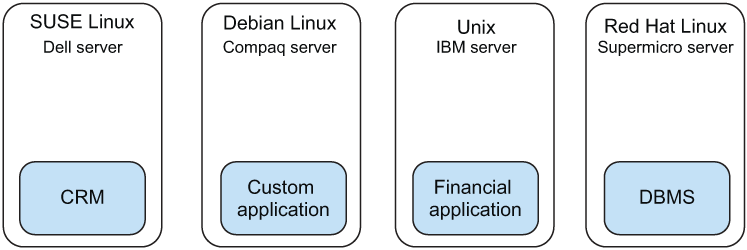
Use the diagram to see how applications were originally tied directly to physical machines and operating systems. section 1.2
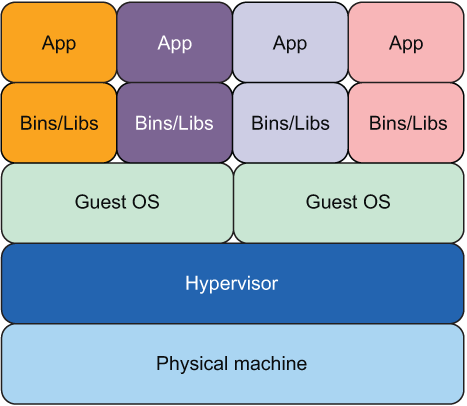
Use the comparison diagram to inspect applications running on virtual machines. section 1.3















