A virtual machine (VM) is a software-emulated computer that runs an operating system and applications in an isolated environment. Each VM includes its own operating-system processes, so it provides stronger isolation than containers but consumes more resources. section 2.1.1
A host computer can run several VMs, but each guest operating system adds CPU and memory overhead. Containers instead run as isolated processes within the existing host operating system, allowing more applications to share the same hardware. section 2.1.1
The practical distinction is:
- VMs isolate applications through separate guest operating systems and their system processes. section 2.1.1
- Containers share the host operating system, reducing overhead but providing weaker isolation than separate VMs. section 2.1.1
- Resource costs often lead teams to group multiple applications in one VM, whereas containers can be dedicated to individual applications. section 2.1.1
Docker Desktop and Kubernetes
Docker Desktop provides a Linux VM that hosts the Docker daemon, Kubelet, Kubernetes components, and deployed application containers. The host's docker CLI can list these containers without logging into the VM. A privileged diagnostic container can expose the VM's namespaces and mounted root filesystem for an inside view. section 3.1.1
Figure 2.1 Running applications in VMs vs. containers
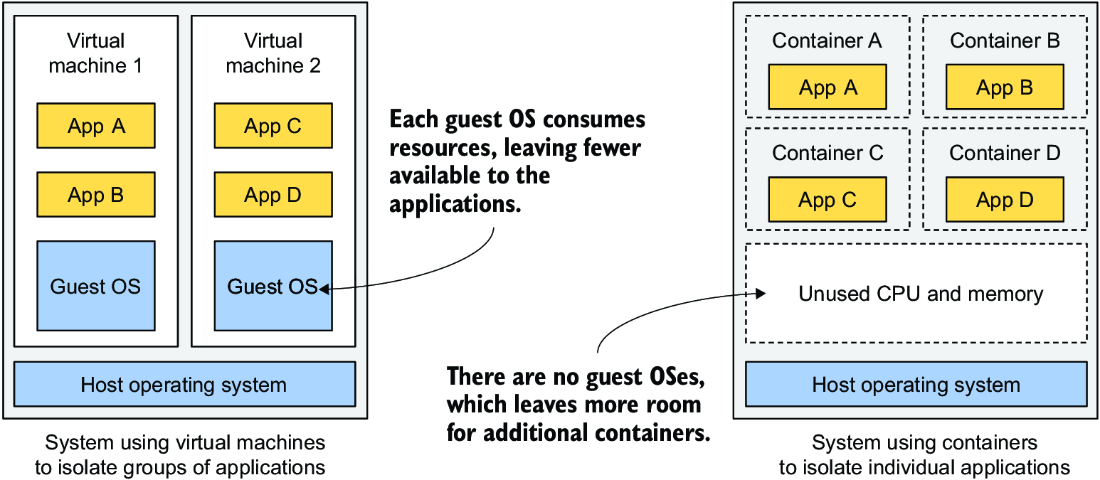
Compare how applications, operating systems, and hardware are arranged when applications run in VMs or containers. section 2.1.1















