A virtual machine (VM) is a guest running on a physical host. A hypervisor isolates guests and presents each with virtual CPUs, memory, networking, and storage. On AWS, Amazon EC2 provides VMs called instances. Unlike a service that runs a single function, an instance provides a full operating system on which you can install and run applications. section 3.1 section 6.1.3
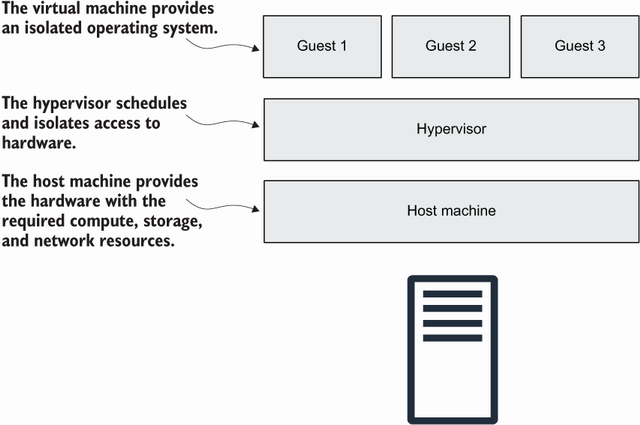
The virtualization diagram places guest VMs above the hypervisor and physical host. section 3.1
Choose a VM when an application needs its own operating system or software installation. Common jobs include hosting a web application, operating an enterprise application, and processing data. EC2 offers operating-system choices including Amazon Linux, Ubuntu, and Windows; the instance type determines the machine’s size. section 3.1 section 3.9
Two VMs serving WordPress
Install Apache, PHP, and WordPress on EC2 instances. Put at least two behind an Application Load Balancer: it sends requests only to instances that pass its health check. A managed MySQL database stores WordPress data, while a network filesystem makes application files and uploads accessible to both VMs. Security groups restrict traffic, including database access from the web servers. section 2.1
Operate an EC2 VM through its instance details and state controls:
- In the EC2 console, open Instances and select a VM. Check its instance ID, instance type, public IPv4 address, and Amazon Machine Image (AMI) ID; use Monitoring to inspect metrics such as CPU use. section 2.2.1
- For startup trouble, select the instance and choose Actions > Monitor and Troubleshoot > Get System Log. Look for startup errors; log entries may take several minutes to appear. section 3.2.1
- Stop an idle instance to avoid compute charges, but account for attached resources. Start resumes a stopped instance; reboot retains persistent data; terminate deletes the instance and cannot be undone by starting it again. section 3.3
A VM is not highly available by default: guest software, the host, hardware, or a data-center dependency can fail. Run multiple instances in different data centers with a load balancer when the application must keep serving requests. Recovery across availability zones also changes the replacement VM’s private IP address, so an application needing a stable endpoint requires an additional arrangement such as a load balancer or an Elastic IP associated during bootstrap. section 1.2.3 section 13.2.4
EC2 gives you operating-system control, but you remain responsible for secure operation, scaling, availability, and maintenance. If a task fits a single function, AWS Lambda instead manages the underlying infrastructure and bills per execution rather than for VM running time. section 6.1.3















