Docker packages an application, its runtime, and dependencies into a container that can run consistently across environments. For agent systems, one focused agent commonly runs per container, making services easier to replace, scale, and version. section 8.2 section 8.6
Use Docker as the deployment layer around agent services:
- Separate concerns by placing the frontend, worker agents, and tool services in distinct containers. section 8.2
- Expose a containerized agent through an API or run it as an MCP server. section 8.2
- Use Docker Desktop for local hosting; use Compose to start a multi-agent stack with one command. section 8.2 section 8.6
- Move to Kubernetes or cloud container services when greater enterprise scale is required. section 8.2
Containerize an image API
Build an image-generator container, run it on a host port, and pass the API key through an environment variable. Then stop and rerun it with a name so Docker Desktop can manage the container and display its logs. section 8.5
Figure 8.4 There are several ways a frontend agent may consume containerized microservice agents: as tools through an API or as MCP servers.
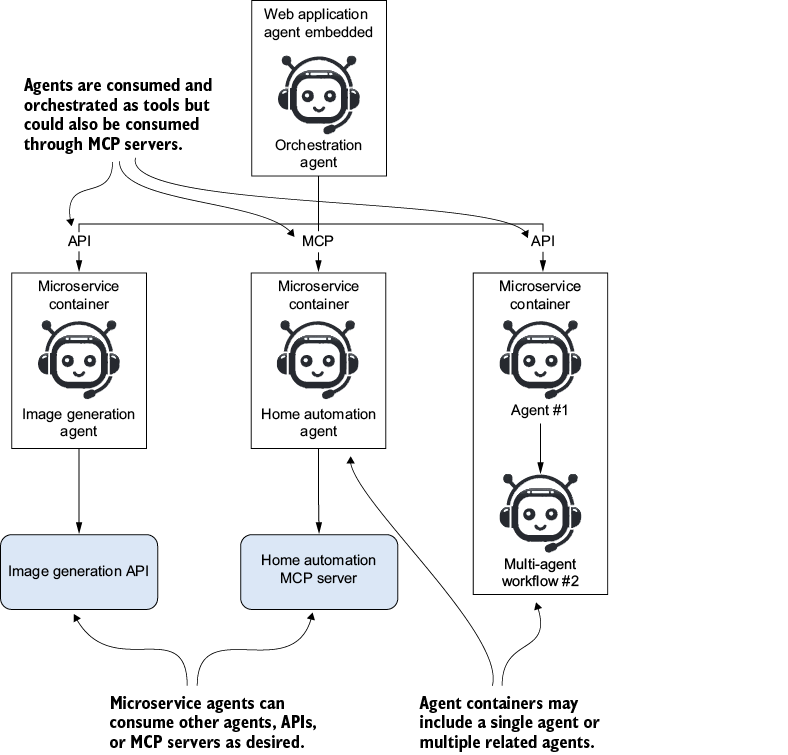
Shows how a browser-based frontend agent can consume specialized containerized agents through APIs or MCP servers. section 8.2

























