Docker packages a Wasm host environment so a compiled guest module can run with a single command. Docker Engine provides a lightweight CLI, while Docker Desktop adds a graphical interface. section 2.3.5
Docker supports Wasm execution through familiar container tooling:
- Mount a local directory into the container so the host application can read a .wasm file. section 2.3.5
- Use --rm for temporary execution, automatically removing the container afterward. section 2.3.5
- Understand the traditional engine path as Docker Engine, containerd, containerd-shim, and runC; Wasm execution substitutes a Wasm-specific shim and runtime. section 7.2
- Treat Docker+Wasm support as experimental and potentially unstable across environments and Docker versions. section 7.2
Run a Wasm guest with Docker
From the guest project directory, copy the compiled module into the working directory, then mount that directory and run the published host image: `docker run --rm -v ".:/data" ghcr.io/danbugs/serverside-wasm-book-code/hello-world-host:latest /data/hello_world_guest.wasm 'Dan'`. The host reads the module and prints `Hello, Dan`. section 2.3.5
Figure 7.4 A closer look inside the Docker engine when executing a Wasm module, showing the key components, including containerd-shim-wasm and the Wasm runtime
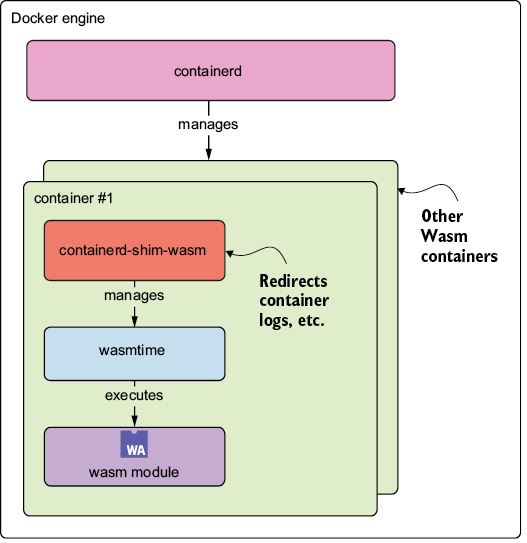
Use the architecture figure to compare Docker's traditional container path with its Wasm execution path, including containerd-shim-wasm and the Wasm runtime. section 7.2

























