An application can be awkward to move between a developer’s laptop, a test environment, and production when each needs its own installation steps and tools. Docker gives those environments a common way to package and run applications: build an image, share it, and run it as a container. section 1.1 section 2.5
A container gives an application its own hostname, network address, and filesystem while sharing the host’s operating system, CPU, and memory with other containers. That combination provides isolation without requiring a separate operating system for every application, as virtual machines do. Containers are lightweight and disposable, but they must match a suitable operating-system and processor platform. section 2.2 section 1.3
Figure 2.3 Multiple containers on one computer share the same OS, CPU, and memory.
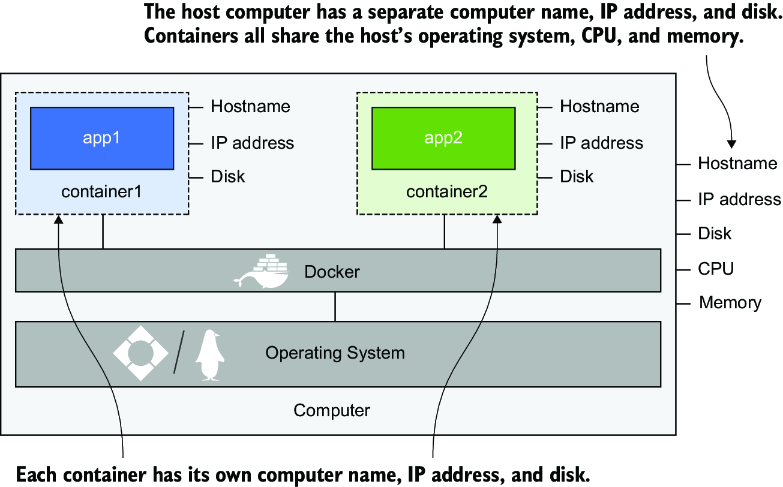
The diagram shows several isolated containers sharing one computer’s operating system and resources. section 2.2
Run a first container
Start Docker Desktop or the Docker service, then run `docker run diamol/ch02-hello-diamol:2e` in a terminal. If the image is not on your machine, Docker downloads it before starting the container. The application prints a greeting and details of its container environment. Check the installation with `docker version` and `docker compose version`; look for Client and Server versions in the first command and a Compose version in the second. section 2.1 section 1.4.3
The Docker command-line interface sends requests to the Docker Engine through its API. The Engine keeps a local image cache and works with the operating system to create containers and virtual networks. Docker Compose describes applications made of multiple containers; Dockerfiles capture the steps used to package applications as images. section 2.5 section 1.1.1
Put that workflow to work in stages:
- Package an existing application first. A monolith can run in one container before you gradually move features into separate containers; containerizing it alone does not remove its architectural limits. section 1.1.2
- For a distributed application, give components their own Dockerfiles and define the complete application with Compose. Share images through Docker Hub or another registry. section 1.1.3 section 5.3
- Use Docker in CI/CD to compile and test in multi-stage builds, test a local deployment with Compose, and publish tested images. section 16.0
Docker can join containers on one machine, but it does not by itself connect servers for scale or high availability; use a container-management platform such as Kubernetes or a cloud service for that. Containers follow open OCI standards, though this workflow uses Docker tools. For a hands-on next step, run a website container and replace its `index.html` file to change the page it serves. section 1.3 section 2.6

























