Docker is a containerization platform for running applications with little traditional installation outside Docker. An image is a portable blueprint containing an application's code, libraries, environment variables, and other dependencies; a running instance of that image is a container. section 7.1
Containers isolate application processes and file systems while sharing the host operating system kernel. Unlike virtual machines, they do not simulate a complete operating system, so multiple isolated applications can run on one host with their own environments and resource limits. section 7.1
Figure 7.1 Docker makes use of the host’s operating system while isolating each of the containers. This makes Docker containers lightweight compared to virtual machines, as they do not require a full OS to run.
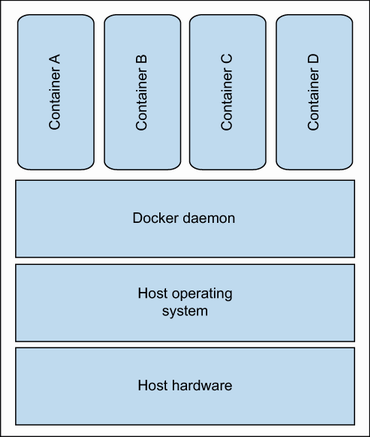
This diagram highlights the central trade-off: containers use host operating-system capabilities while keeping each application isolated, making them lighter than virtual machines. section 7.1
A practical local workflow is:
- Draft a Dockerfile that selects a base image, sets a working directory, copies application files, installs dependencies, exposes the application port, and declares the startup command. section 7.1
- Build the Dockerfile into a tagged image with docker build. section 7.1
- Run the image as a named background container and publish a host port to reach the application. section 7.1
- Start a PostgreSQL container to obtain a local empty database before creating schemas, tables, and seed data. section 5.1
Containerizing a Python application
A Dockerfile can start from python:3.10-slim-buster, copy a Python application into /app, install requirements.txt, expose port 8080, and run main.py. Build it as itam:latest, then run a named itam container with port publishing. Generated infrastructure code still needs inspection and testing: tooling support can produce an empty or incomplete Dockerfile. section 7.1

























