Docker packages applications and their dependencies into standardized containers that can run through a container runtime. This helps teams avoid repeated setup work when projects combine Go, Python, JavaScript, databases, or queuing systems. section 7.1
A container is built from an image: a reusable template describing what the system should look like. One image can create many containers, while the runtime shares the host operating system’s kernel and hides underlying implementation details. section 7.1
A practical Docker workflow connects development and deployment:
- Install Docker as the container runtime for the local machine. section 7.3
- Use Cloud Native Buildpacks and pack to choose a builder and create an application container. section 7.3
- Run the resulting image locally, call the application endpoint, and publish the portable package for others to use. section 7.3
Build and run a Go service
For a Go project, the builder can identify the module and main package, build the application into a container, and run it with: pack build hello-api --builder gcr.io/buildpacks/builder:v1 followed by docker run hello-api. section 7.3
Figure 7.2 Applications work with an operating system within the container, which interacts with the container runtime. The runtime then runs as a process within the host operating system like any other application.
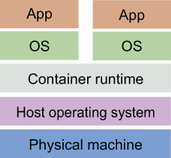
The runtime relationship clarifies how an application interacts with the container operating system, container runtime, and host operating system. section 7.1

























