Docker packages applications into isolated containers so teams can run separate parts of a system without installing and configuring every technology directly on the host machine. For a financial dashboard, that makes it practical to keep the user interface, API, and database as distinct, manageable pieces while still bringing them up together. section 3.1 section 3.9
Figure 3.1 An overview of our ACH system
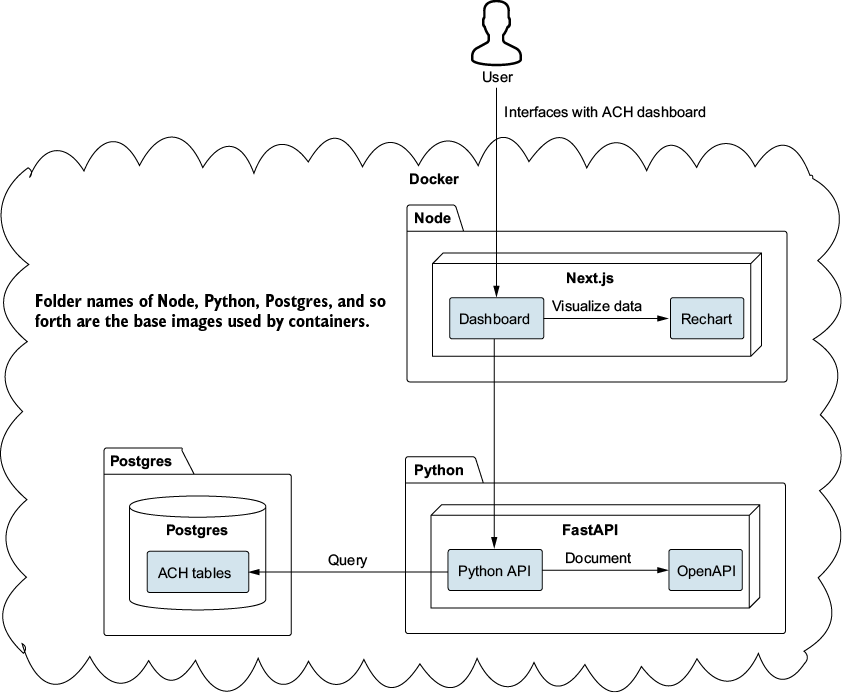
A containerized dashboard environment separates the Node and Next.js UI, FastAPI API, and PostgreSQL database. This service-oriented layout provides a concrete starting point before each component evolves independently. section 3.1 section 3.9
A container is described declaratively and can be distributed for others to use. Docker Compose centralizes a multicontainer application in a docker-compose.yml file, where applications, containers, and services are configured together. Start with one working container rather than asking an AI tool to generate a large, unverified environment; short changes and quick feedback make it easier to identify what fixed a problem. section 3.2 section 3.2
A practical Docker workflow for a growing application is to:
- Establish initial connectivity among small placeholder components, then develop each component incrementally. section 3.1 section 3.9
- Use Docker Compose to manage services from one location as the UI, API, database, and related tools are added. section 3.2
- Pass configuration through build arguments and environment variables rather than hardcoding sensitive values. section 6.8 section 3.9
- Use health checks, least privilege, vulnerability scanning, and image optimization as the environment moves toward production. section 3.0 section 3.9
Containerizing a Next.js dashboard
A dashboard service can build from its own directory, pass NEXT_PUBLIC_API_URL as a build argument, expose port 4000, and use a Dockerfile to install dependencies, build the application, and start it. Because the code runs in the browser, the configured API address uses localhost:8081 rather than Docker's internal wiremock:8080 reference. Running docker-compose down followed by docker-compose up --build rebuilds and starts the containers; opening localhost:4000 displays the dashboard with WireMock data. section 6.8 section 6.8
Containers support exploration as well as delivery. Images can provide a disposable sandbox for products and technologies such as PostgreSQL, WSO2 API Manager, Golang, MongoDB, or Debian Linux: start one quickly, evaluate it, and remove it when finished. Container use does not automatically require microservices; architecture choices should reflect project size, team experience, requirements, risk, and existing infrastructure rather than a trend. section 12.2.1 section 3.0 section 3.9

























