An MCP server implements the Model Context Protocol to expose tools, data sources, and other capabilities to AI applications. It keeps those capabilities outside the agent harness, allowing an agent to discover and use external context and operations without hard-coding each integration. section 4.5.1 section 4.5
An MCP host manages clients that connect to servers; each client maintains a dedicated session with one server. Clients discover capabilities, the host aggregates them for the model, and the agent selects a tool or resource. The server validates and executes the request, then returns a response that can update the model’s context. section 4.5.1
Figure 4.5 High-level architecture of an MCP-enabled AI agent: the host uses dedicated clients over STDIO or streamable HTTP to discover and invoke tools, resources, and prompts across independent MCP servers
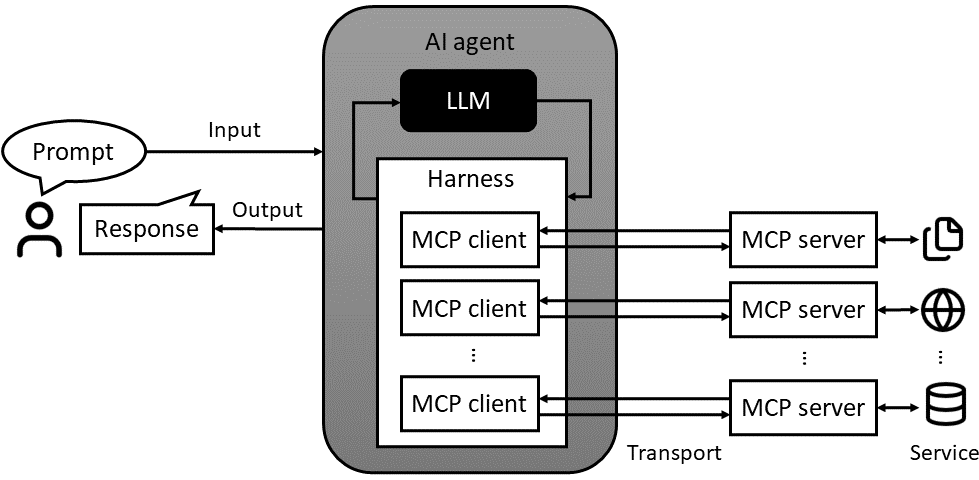
Follow the connections from the host’s dedicated clients to independent servers and their capabilities. section 4.5.1
Servers expose three categories of capability: tools, resources, and prompts. Tools perform actions through executable functions. A tool definition includes a name, a natural-language description, parameter schema, and output schema. In multi-server deployments, qualified names such as GitHub:create_issue help route calls and reduce naming collisions. section 4.5.2
Filesystem access through Goose
Configure Goose Desktop to start the Filesystem MCP Server over STDIO with `npx -y @modelcontextprotocol/server-filesystem <path-to-shared-folder>`. The agent can then, for example, save a poem or read and summarize text files. Restrict the shared path to a dedicated sandbox: access can allow the agent to read, modify, or delete files there. section 4.6.3
Custom browser server
A minimal JavaScript server can use the official MCP SDK for protocol handling, zod for schemas, and Selenium for browser automation. Register tools with names, descriptions, input schemas, and execution functions, then connect the server to a transport. Example tools open a browser, navigate to a URL, read visible page text, and close the browser; this setup is not production-grade browser automation. section 4.6.4
Listing 4.3 JavaScript sample showing one tool registration in a basic MCP server for browser manipulation
import { McpServer } from "@modelcontextprotocol/sdk/server/mcp.js";
import { StdioServerTransport } from "@modelcontextprotocol/sdk/server/
stdio.js";
import { z } from 'zod';
import { Builder } from 'selenium-webdriver';

let driver;

const server = new McpServer({
  name: 'mcp-selenium-server',
  version: '1.0.0',
});

server.registerTool( #1
  'open_browser',
  {
    description: 'Launches a new browser instance.',
    inputSchema: z.object({
      browser_name: z.string().describe('The name of the browser to open'),
    }),
  },
  async ({ browser_name }) => {
    if (driver) {
      return {
        content: [{ type: 'text', text: 'Browser is already open.' }],
        isError: true,
      };
    }
    try {
      driver = await new Builder().forBrowser(browser_name).build();
      return {
        content: [{
          type: 'text',
          text: `Browser "${browser_name}" started successfully.`,
        }],
      };
    } catch (error) {
      return {
        content: [{
          type: 'text',
          text: `Failed to open browser: ${error.message}`,
        }],
        isError: true,
      };
    }
  },
);

const transport = new StdioServerTransport(); #2
await server.connect(transport);
Inspect a representative JavaScript tool registration and its input schema. section 4.6.4
MCP uses JSON-RPC over STDIO for local connections and Streamable HTTP for remote connections; earlier SSE transport support was deprecated in favor of Streamable HTTP. In software development, servers can supply workspace or repository context and enable actions such as opening pull requests or triggering pipelines. section 4.5.1 section 11.3.4