Connecting more tools can make an agent less effective: tool definitions and results consume context that could otherwise hold code and conversation. An MCP server makes external capabilities available to an agent, but each integration needs to justify its cost and access. section 3.3.5 section 9.5.1
An MCP server is a lightweight service that exposes structured, executable tools through the Model Context Protocol, an open standard based on JSON-RPC. An MCP client runs where the agent runs and communicates with domain-specific servers. Each server translates requests to an external system and returns structured data the model can use. section 3.3.1
Figure 3.2 MCPs and universal integration tools for agents - The MCP client (center) communicates with domain-specific servers via a standard protocol. Each server translates between the agent's requests and the external system's API, returning structured data the model can reason about.
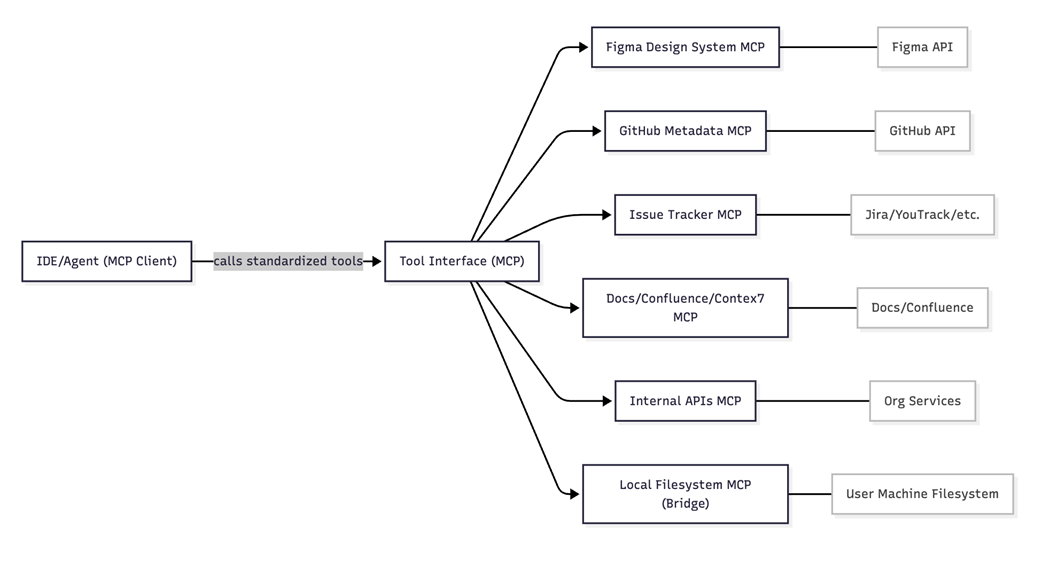
The diagram shows how one client connects to domain-specific servers through a common protocol. section 3.3.1
Building a UI component
An agent can retrieve design tokens and layout constraints from a Figma server, inspect an existing React component through GitHub or filesystem tools, and obtain an API schema from a documentation server. The Figma call supplies a snapshot, not a live link. Emitting CSS token references is useful only if the project also supplies those tokens, for example through an existing export pipeline. section 3.3.2
Researching a dependency
For a missing file picker, an agent can use a library research server to find candidates, then Context7 to retrieve installation instructions, API references, and examples for the selected version. Retrieved documentation improves the evidence available to the agent; it does not guarantee the resulting integration is correct. section 3.3.3
Treat servers as production dependencies, not free capabilities:
- Connect a small set of integrations relevant to the work. Too many tool definitions and results can increase token use, confuse the model, and expose sensitive information. section 3.3.5
- Vet servers and standardize team configurations. Registries improve discovery but do not eliminate risks such as prompt injection, tool poisoning, and permission escalation. section 3.3.5
- Use a proxy to load relevant capabilities on demand when tool count becomes a problem; use a gateway for centralized authentication, access policies, and audit logging where needed. section 3.3.5
- Compare an MCP integration with an available CLI. CLI tools can avoid persistent MCP tool-schema overhead, although the choice still depends on the workflow. section 9.5.1
Table 9.6 Context Usage claude-sonnet-4-5
|
Source
|
Tokens
|
Share
|
|
System prompt
|
3,900 tokens
|
2%
|
|
MCP tools
|
58,400 tokens
|
29%
|
|
Memory files
|
1,200 tokens
|
1%
|
|
Messages
|
42,000 tokens
|
21%
|
|
Free space
|
94,500 tokens
|
47%
|
This context breakdown illustrates the hidden cost: MCP tool definitions occupy 29% of the example session’s context window. section 9.5.1