The Model Context Protocol (MCP) is an open standard for connecting AI applications to external tools and data sources. Instead of wiring each integration into an assistant, developers expose capabilities through MCP servers. Any compatible client can discover and invoke them, making tools reusable across applications and frameworks. section 12.0 section 12.1
MCP separates three roles: an application presents the user experience, an MCP client communicates with servers, and an MCP server executes capabilities and returns structured results. An agent may decide whether to use a tool, but the MCP client handles protocol communication; they are not the same component. One application can connect to multiple servers without rewriting its core assistant logic. section 12.2 section 12.0
An MCP server can expose three kinds of capability:
- Tools: callable operations, such as fetching data from an external API. section 12.4 section 12.3.2
- Prompts: reusable instructions that clients can invoke. section 12.4 section 12.8
- Resources: content clients can retrieve as context or reference material. section 12.4 section 12.8
Figure 12.3 How the Vercel AI SDK communicates with a local MCP server through stdio transport. The MCP client spawns the server as a separate Node.js process, and they exchange JSON-RPC messages via stdin/stdout. When the model calls a tool like get-chuck-joke(), the request flows through stdio to the MCP server, which executes the actual HTTP request and returns the response.
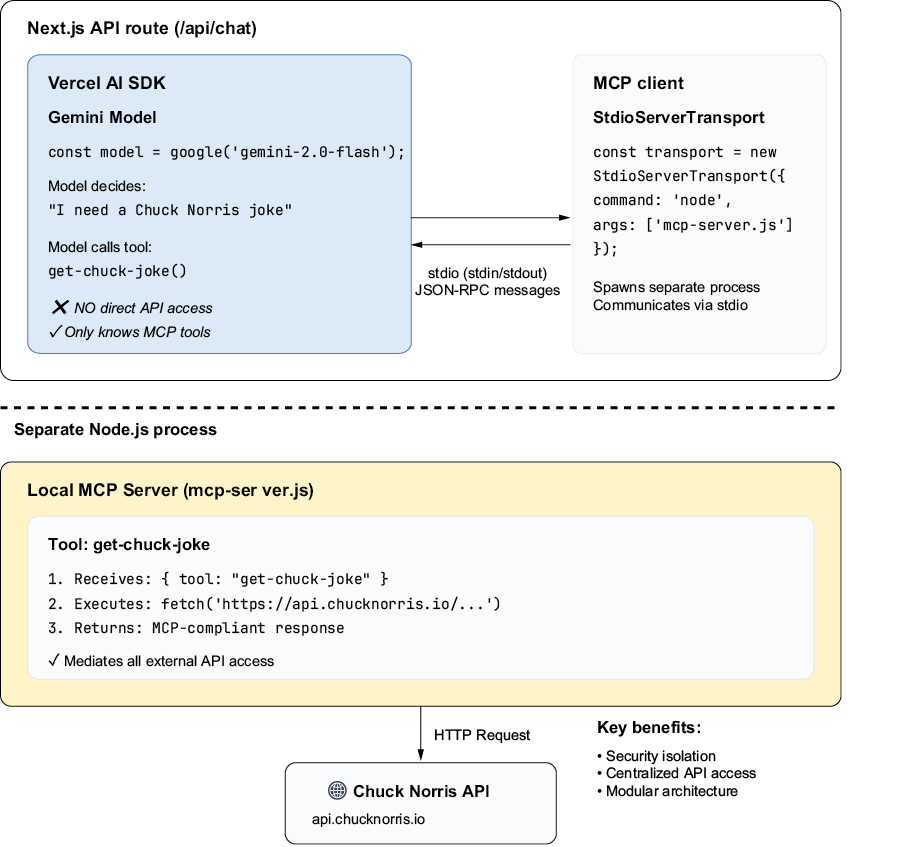
Follow the local tool call from the AI SDK’s MCP client, through stdio to a separate Node.js server, and back with the API result. The model does not make the HTTP request itself. section 12.3.2
A Next.js chat tool backed by an API
A local MCP server registers a tool that fetches a random joke and returns it as text content. A Next.js API route starts the server through StdioClientTransport, creates an MCP client with experimental_createMCPClient, retrieves its tools with mcpClient.tools(), and passes those tools to streamText. The model can select the tool when a user asks for a joke; the server makes the external request. The example returns a fallback message if that request fails. Because stdio connects local processes, this server does not expose its own HTTP endpoint. section 12.3.2 section 12.3.3
The same server can supply tools to a LangChain.js agent through MultiServerMCPClient rather than directly to the Vercel AI SDK. For production, treat MCP servers as operational services: control access and API keys, monitor performance and uptime, and return predictable errors or fallbacks. Resources and prompts need unique identifiers and URIs with structured responses. section 12.5.1 section 12.4.2













