An agent that needs a database, an API, and local files can end up with a different custom tool wrapper for each source. MCP reduces that repeated integration work: a service exposes tools through an MCP server, and applications discover and call them through a common interface. section 13.1 section 13.1.2
MCP uses a client/server architecture. The agent or application is the host; it connects to one or more servers through MCP clients. Each server exposes tools backed by its own resources. The agent discovers the available tools and invokes the ones it needs; servers handle the operations and return results in a standardized format. section 13.1.2 section 13.5
Figure 13.1 MCP host process connecting to multiple local and remote MCP servers via MCP clients, each exposing tools backed by various resources. This architecture enables agents to flexibly access both local documents and online services through standardized tool interfaces.
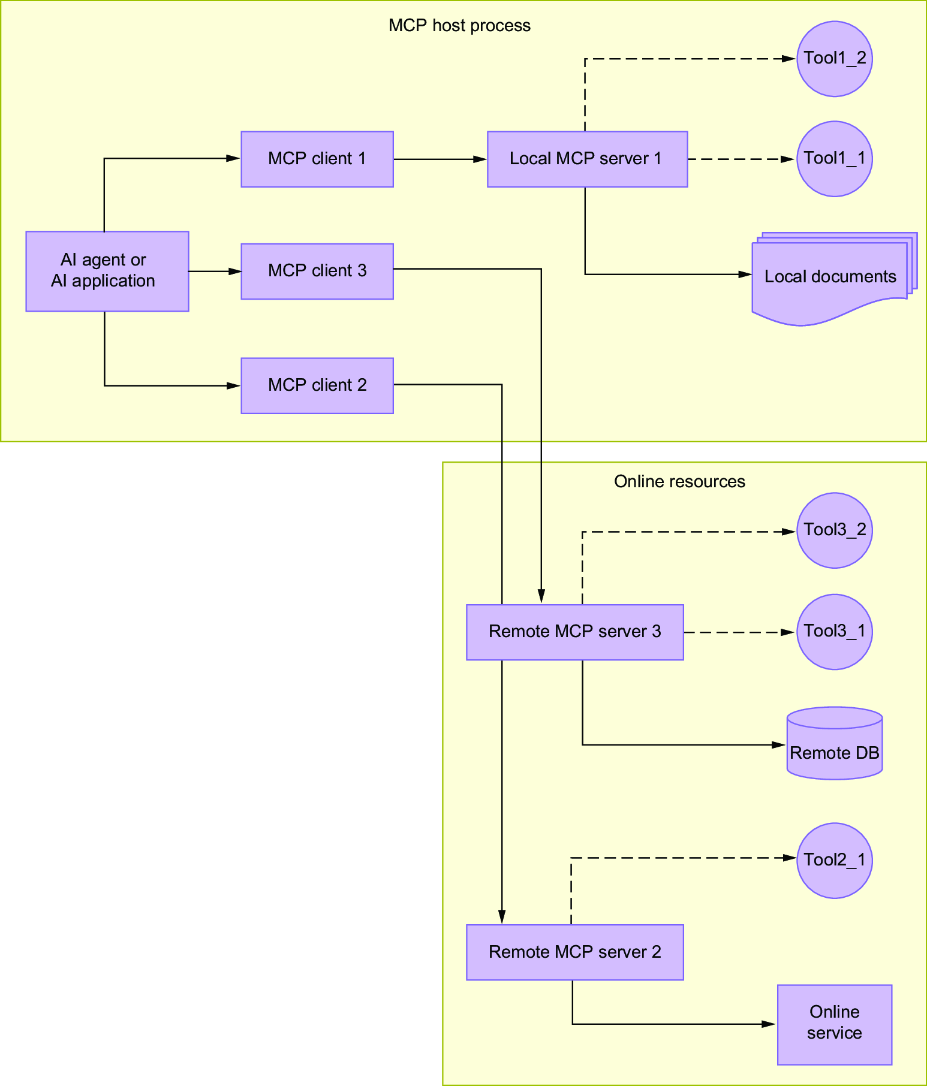
The diagram shows one host reaching multiple local and remote servers through MCP clients, with each server supplying its own tools. section 13.1
A practical integration proceeds in stages:
- Check whether the service already offers an MCP server before writing another connector. Public server directories can help locate candidates. section 13.1.3 section 13.5
- For a new service, expose its operations as server tools using an official SDK, such as FastMCP 2 for Python or the TypeScript MCP SDK. Avoid reimplementing the protocol from scratch. section 13.2.1 section 13.5
- Test the server with MCP Inspector, then configure the agent to connect and make the tools available alongside its local tools. section 13.5
Remote servers use Streamable HTTP; local servers can use standard input/output, often for development or local resources. Once connected, MCP tools can fit into an existing tool-calling workflow without changing well-separated agent logic. MCP also covers prompts, files, and other resources, but tool exposure is only one part of the protocol; consult the specification for transport and security details. section 13.1.2 section 13.2.1
Weather tools in an agent
A weather-data service can expose its operations through an MCP server, which is tested before connection to an agent. In a mixed workflow, the same agent could call a local calculation function, an MCP-served query, and a local formatting function without treating remote tools as a separate kind of task. section 13.0 section 13.5













