Model Context Protocol (MCP) gives AI agents a common way to discover and use tools. Without it, each custom tool needs its own definition and execution bridge, creating integration and maintenance work as an agent’s toolset grows. An MCP-compatible client can instead connect to compatible tool servers without a bespoke wrapper for each one. section 3.3.4 section 3.4
The architecture has three roles. The host receives the user’s request and uses an LLM to decide whether a tool is needed. An MCP client connects the host to one server, discovers its tool definitions, and forwards execution requests. The server exposes and runs tools, potentially calling an external API or database. The returned result can then enter the LLM’s context for further reasoning. section 3.4.1 section 3.0
Figure 3.5 MCP server–client architecture. The host contains the LLM for reasoning and user interaction, connecting through MCP clients, which manage server communication. MCP servers expose tool definitions and handle execution, optionally integrating with external services such as databases and APIs.
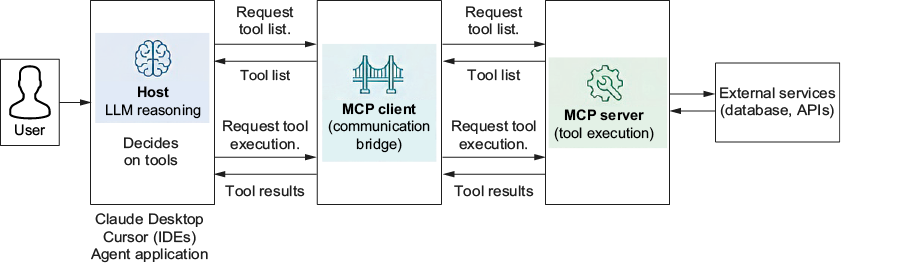
The diagram makes the boundary between LLM decision-making, client communication, and server-side execution visible. section 3.4.1
Two standardized interactions replace much of a custom tool integration:
- Discovery: request the server’s available tools and receive definitions that describe how to call them. section 3.4.1
- Execution: send a tool name and arguments to the server, then receive its result in a consistent format. section 3.4.1
Turn a web-search function into an MCP tool
Create a FastMCP server and decorate the existing Python search_web(query: str, max_results: int = 5) function with @mcp.tool(). FastMCP derives its tool schema from the function name, parameters, type hints, and docstring; the search logic stays in the function. Start the server with mcp.run(transport='stdio'). A client can launch it through StdioServerParameters, initialize a ClientSession, and call list_tools() to verify that search_web is available. Pointing the same client pattern at another compatible server changes the available tools without requiring a new discovery interface. section 3.4.4 section 3.4.1
MCP servers can also offer reusable prompts and accessible resources, but the tool path is the relevant one when an agent must take actions. MCP standardizes discovery and invocation; the host still decides when a tool is useful, and the server still performs the work. section 3.4.1













