Data visualization represents data with graphical forms so people can see patterns, relationships, values, and a story. A useful visualization balances visual interest with legibility: the audience should focus on what the data communicates, not merely on decorative complexity. section 1.3
On the web, D3.js supports custom, dynamic, and interactive visualizations. It can bind data to graphical elements rather than restricting a project to predefined chart types, making it suited to responsive dashboards, research prototypes, scrollytelling, maps, networks, and unusual visual forms. section 1.0 section 1.1.1 section 1.1.2
A practical visualization workflow moves from prepared data to an interpretable interface:
- Gather, clean, format, and explore a dataset; identify quantitative and qualitative attributes and the story worth communicating. section 1.1.2 section 14.7
- Sketch a layout, then break its visual channels and geometry into smaller implementation blocks. section 14.0 section 14.7
- Load and measure data, bind it to DOM elements, and use scales to translate values into positions, sizes, colors, or other visual attributes. section 3.0
- Build the interface with HTML, CSS, JavaScript, and usually SVG or Canvas; add interactions that answer meaningful user questions. section 1.2 section 14.7
- Explain the chart’s purpose and encodings, label controls and axes, simplify prose, and check whether people can interpret the result. section 1.3 section 10.2.1
Choosing D3 for a custom project
A business dashboard may need to reveal customer behavior in a fast, interactive, shareable form that a business-intelligence tool cannot provide. A scrollytelling project may instead transform graphics on scroll, reveal details on mouse events, and adapt to screen size. These needs favor D3 over tools aimed at quick exploration or simple standard charts. section 1.1.1 section 1.1.2
Accessibility is part of visualization, not an afterthought. Provide surrounding context and instructions; state what marks represent and what position, size, and color mean; include legends and axis labels; and keep text easy to read. Responsive layouts must also preserve readable labels on smaller screens. section 10.2.1
Figure 3.1 The D3 data workflow
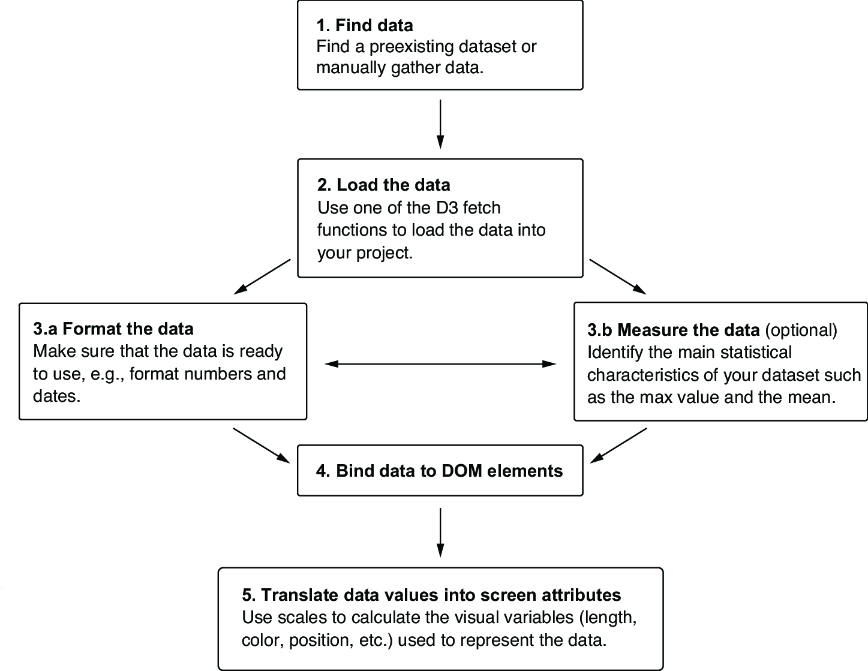
Use the D3 data workflow diagram to connect source data, data preparation, binding, scales, and rendered visual elements. section 3.0















