Data visualization represents data graphically to reveal trends, anomalies, comparisons, and opportunities for optimization. Atlas Charts connects directly to MongoDB data and provides a no-code interface for building shareable charts and dashboards. section 19.1 section 19.0
Atlas Charts supports several practical visualization workflows:
- Choose a MongoDB collection, database view, or custom Charts view as the data source. section 19.1
- Build bar charts, line graphs, heat maps, and dashboards from document data, including embedded objects and arrays. section 19.1
- Use aggregation metrics such as mean and standard deviation, then embed charts in applications or dashboards for ongoing analysis. section 19.1
- Create charts with natural-language requests when writing aggregation pipelines or chart specifications is unnecessary. section 19.1.1
Natural-language restaurant analysis
Ask, “What are the top 10 cuisines in terms of the number of restaurants in each borough?” Atlas can generate a borough-by-borough chart from the sample_restaurants database and restaurants collection. The resulting aggregation groups by cuisine and borough, counts valid restaurant identifiers, maps the results to chart axes and colors, sorts by total count, and selects the top 10 cuisines. Review the generated pipeline when validating the chart or refining its result. Natural-language requests transmit the query, collection schema, and sample field values to MongoDB’s backend and/or its AI provider; connection strings and credentials are not transmitted. section 19.1.1
Figure 19.1 This example dashboard displays the total number of movies (2,658) and their average Metacritic score (55). The Movie Ratings pie chart breaks down films by rating categories. The Top 10 Genres bar chart highlights the most popular genres, with Drama leading. The Top 10 Languages chart shows that English dominates, and the Most Prolific Actors chart identifies actors with the most appearances, categorized by critic ratings (Fresh, Not Rated, and Rotten). (Image © MongoDB 2025)
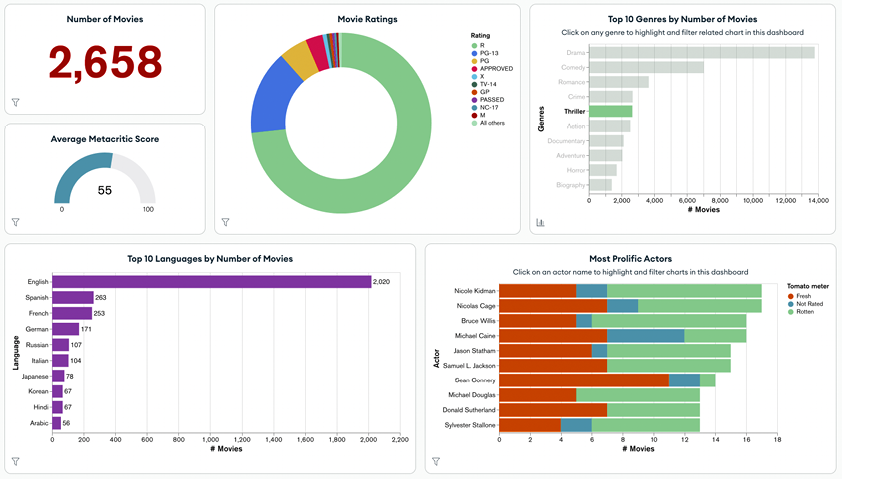
Use the dashboard to compare movie counts, average scores, ratings, genres, languages, and prolific actors in one visual workspace. section 19.1















