Visualization, often called data viz, communicates quantitative information visually. Charts, graphs, maps, pictures, and iconography can translate numbers into something people can quickly take in. The medium is flexible: a printed page, interactive web page, infographic, paper sketch, or even a three-dimensional object can work. section 1.1
Its purpose is not merely to make data look nice. A visualization helps an audience understand a message, answer questions, and notice what matters. Start with the audience: talk with intended users early, learn what they need, and check that the result addresses their questions without burying them in complexity. Trying to serve everyone usually leaves nobody well served. section 1.3 section 1.0
A useful visualization is judged by what it enables people to perceive and understand:
- Keep it simple enough that the main message is not lost in clutter. section 6.1
- Hold attention by being relevant and by giving the audience a clear, informative title that establishes context. section 6.1.2
- Tell the truth: do not use titles, truncated axes, or dual axes to imply a conclusion the data does not support. section 6.1.4
- Get the point across with a title, visual encoding, and supporting labels, annotations, or callouts. section 6.1.5
Design choices shape what viewers notice. Color, form, and spatial position can encode data; relationships can be conveyed through enclosure, proximity, similarity, symmetry, connection, closure, and continuity. Choose a chart type with the data and intended message in mind rather than treating a chart gallery as a recipe book. section 6.0 section 6.4
A few practical cautions go a long way. Pie and donut charts make angle comparisons difficult, so keep segments few and avoid comparing separate pies. Untangle crowded line charts with separate panels or small multiples. Remove automatically generated gridlines, axes, and labels unless they earn their place; decoration should support rather than distract from the message. section 6.4
One page, six dimensions
Charles Minard’s map of Napoleon’s 1812 Russian campaign combines troop counts, distance, temperature, latitude and longitude, travel direction, and time on a single page. It is a reminder that a compact display can still carry a remarkably rich story. section 1.4.3
Figure 6.7 The Dramatic Rise of Rhino Poaching, created by Ash Shih in 2019 for the #MakeoverMonday project. Notice the simple use of color, the way the lines point out the key aspects of the data, and the little touch of decoration, which is the image of a rhino behind the chart, echoing the curve of the line and giving a sense of balance with the callout on the left. I did slightly modify the color of the axis labels and data citation to be a bit brighter so you could see it in print. Check out the original here: http://mng.bz/A8Po. (Ash Shih. Used with permission)
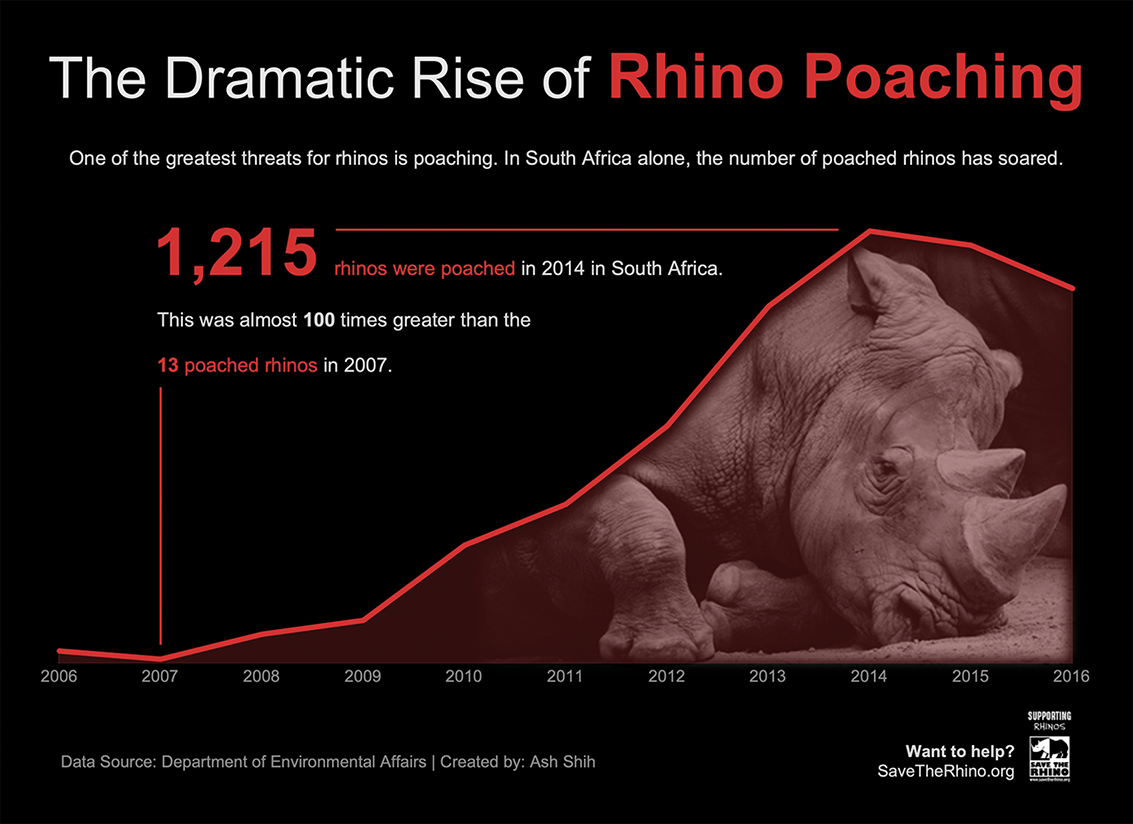
This rhino-poaching line chart illustrates how a direct title, restrained color, a trend line, and a callout can reinforce one clear message while holding attention. section 6.1.2 section 6.1.5
Tools involve a trade-off between convenience and control. Spreadsheets make quick charts accessible and permit calculations and formatting, while coding offers more control with a higher barrier to entry. Vector output such as SVG can be refined in Adobe Illustrator or Figma for a one-time visualization, but tool popularity alone does not make a tool suitable for the job. section 1.5.1 section 1.6















