Visualization turns security data into charts, graphs, heat maps, and dashboards that make trends, anomalies, and events easier to interpret. It sits between data processing and action: collected logs or other records must be prepared for analysis before a display can help analysts investigate or leaders make decisions. section 2.0 section 3.2.4
Design each display around the decision its audience needs to make:
- Keep it clear: avoid clutter, use readable labels and concise text, and arrange information logically. section 2.2
- Choose relevant metrics: analysts may need vulnerability status and incident response times; executives may need risk exposure and compliance status. section 2.2
- Make it accessible and consistent across devices and levels of technical expertise, including consistent colors, fonts, and icons. section 2.2
- Connect a signal to a next step. A rise in failed logins, for example, should let an analyst drill into the underlying data. section 2.2
A report can use dashboard screenshots or charts to show detected incidents over time, vulnerability remediation, or a critical alert. Tailor the explanation as well as the graphic: technical teams, executives, and regulators need different levels of detail. Regular, easily interpreted updates help communicate security risks and mitigation work without relying on jargon. section 3.2.4 section 3.2.6
Read an incident-frequency chart
A chart groups incidents such as failed logins, malware detections, and data access violations by type. Its bars show how often each type appears. If failed logins lead, investigate the pattern rather than treating the tallest bar as a confirmed diagnosis: possible explanations include a brute-force attack or poor password practices. Pair the chart with incident severity, timestamps, and response recommendations when deciding what to prioritize. section 13.8.1
Figure 13.3 Failed login reasons summary showing incorrect password as the most common failure
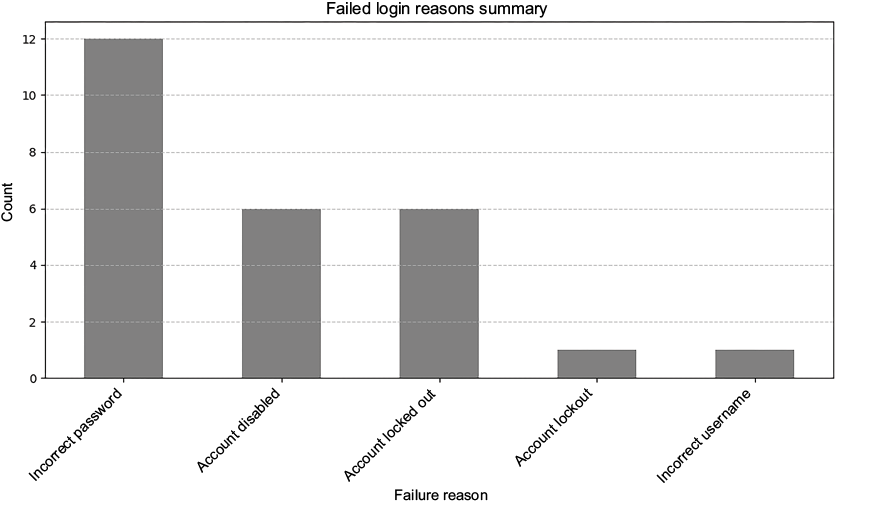
The failed-login reasons summary illustrates how a chart makes the most common category—incorrect password—quickly visible. section 13.7
Charts can also close an automated analysis pipeline: a local language model generates fictitious security records, Python organizes and analyzes them, and the results become charts or reports. Generated data is useful for simulating scenarios, not evidence that those events occurred in an organization. Select visualization tools according to security objectives, integration needs, team expertise, and resources. section 13.6 section 2.1















