liveBook · Manning

Visualization

As explained in Build Python Web Apps with Streamlit

Data visualization is the graphical representation of data to support exploration, interpretation, and communication.

Data visualization represents data graphically so people can explore patterns, interpret results, and communicate important findings quickly. In workplace dashboards, charts turn metrics into a focused story for decision-makers. section 6.0 section 6.5

Choose the visual form according to the question:

  • Use line charts to show how a metric changes over time. section 6.1.3
  • Use pie charts to show how a whole quantity breaks down across a dimension. section 6.1.3
  • Place important metrics prominently, then let filters and date ranges control the displayed slice of data. section 6.1.3

A practical workflow is to wrangle data with pandas, create charts with a visualization library, and display them in Streamlit. Supported options include Matplotlib, Plotly, Altair, GraphViz, and PyDeck. section 1.3.7 section 6.5

Interactive histogram

Generate sample values with NumPy, create a Matplotlib histogram, let the user choose the number of bins with a Streamlit number input, and render the figure with Streamlit. section 1.3.7

Figure 1.6 A histogram in Streamlit created using the popular Matplotlib library
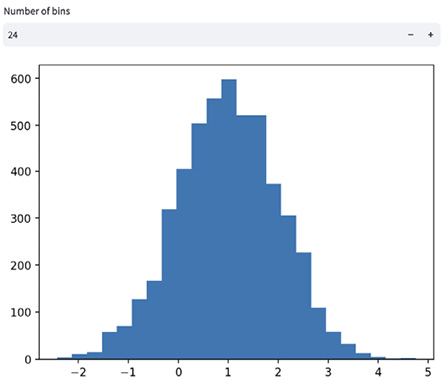
Use the histogram figure as a compact example of a chart rendered inside a Streamlit application. section 1.3.7


How Build Python Web Apps with Streamlit covers it

How deep it goes
Builds from chart selection and layout requirements through pandas preparation, Plotly construction, and Streamlit display.
Examples
Uses histograms, line charts, pie charts, KPI dashboards, editable dataframes, filters, and date-range selectors.
What it assumes
Assumes basic Python familiarity while introducing visualization libraries, pandas dataframes, dashboard requirements, and chart selection.
What you can do after
Build it from scratch by preparing data, selecting suitable charts, adding controls, and rendering visualizations in Streamlit.
How it connects
Connects dashboards, metrics, pandas, dataframes, Streamlit, Plotly, Matplotlib, Altair, GraphViz, PyDeck, filters, and time series charts.

Also explained in

Compare how 16 books explain visualization →

Related concepts

This explainer was generated by Manning's knowledge graph from the text of Build Python Web Apps with Streamlit. The section links point to the parts of the book it draws on.













