A database is an organized logical store inside a Cosmos DB account. It sits between the account and the containers or collections that hold documents—rather like an apartment building’s address book, but with fewer elevators. section 11.1
In Cosmos DB’s MongoDB context, a database groups collections under one account. A MongoDB collection acts as the container that stores data, while documents are the records inside it. section 11.1
Database choices serve different application needs:
- Relational databases organize structured data for retrieval, manipulation, and analysis, with Azure SQL Database, Azure Database for MySQL, and Azure Database for PostgreSQL among the available options. section 10.0 section 10.3
- Cloud database designs also require attention to performance, cost, disaster recovery, security, encryption, access control, and auditing. section 10.1
Creating a Cosmos DB database
After creating the alpacacosmosdbaccount Cosmos DB account, create a MongoDB database named alpacacosmosdb with the Azure CLI. Then create a collection such as alpacacontainer beneath it; that collection serves as the database’s container. section 11.1
Figure 11.1 A Cosmos DB account holds databases, which in turn has containers that hold documents.
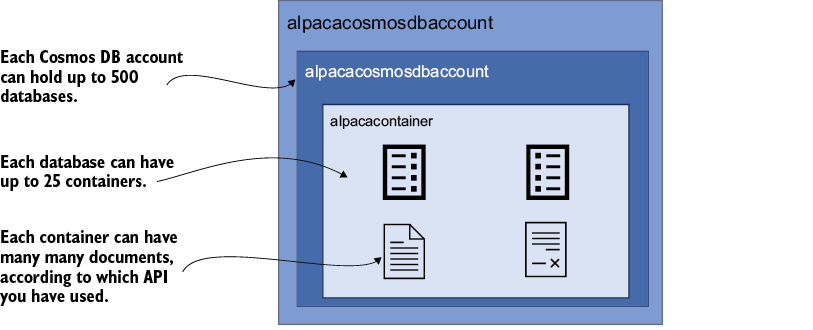
Use the hierarchy diagram to see how a Cosmos DB account contains databases, which contain containers, which hold documents. section 11.1























