A database is an organized data store that keeps application data outside a service's pod memory, allowing that data to persist across restarts and be shared by multiple replicas. section 2.4.3
Externalizing state lets Kubernetes distribute requests across replicas without each replica maintaining a separate view of the data. Scaling still requires checking database connection-pool limits. section 2.4.3
Database choices follow the application's data and deployment needs:
- Use a relational database such as PostgreSQL when the service's data is structured relationally. section 5.1.1
- Use a NoSQL database such as Redis when it suits the service's stored data; the Agenda service uses Redis while C4P uses PostgreSQL. section 5.1.1
- Provision databases directly in Kubernetes with Helm Charts, or use a managed cloud service that includes database software, operating-system, hardware, and monitoring costs. section 5.1.1 section 1.1.1
Conference application
The Agenda service stores agenda items in Redis and the Call for Proposals service stores proposals in PostgreSQL. With state outside the pods, multiple Agenda replicas can answer requests while sharing the same application state. section 2.4.3 section 5.1.1
Figure 5.2 Provisioning a new PostgreSQL instance using the PostgreSQL Helm Chart. #1 Install a helm chart into a Namespace inside a Kubernetes Cluster; #2 The chart creates Kubernetes resources such as StatefulSets and Deployments to provision a PostgreSQL instance; #3 A Service needs to connect to the newly created instance, this can be done manually or by referencing a Kubernetes Secret that contains the credentials and details on how to connect.
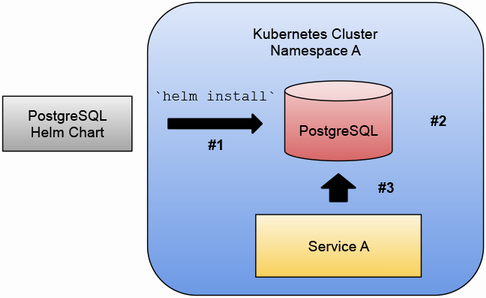
A PostgreSQL Helm Chart installation creates Kubernetes resources such as StatefulSets and Deployments, then exposes connection details through configuration or a Kubernetes Secret. section 5.1.1























