A database stores data so software can retrieve and analyze it. A relational database is a collection of tables. Think of each table as a spreadsheet: named columns describe the fields, and each row holds one record. Columns can have data types, such as text or numbers. section 5.2.1
A table of video games
In a games table, each row represents a video game. Columns include its name, platform, release year, and genre. SQLite can store this table in a games.db file, ready for queries such as counting records or finding games from a particular year. section 5.2.1
To turn a CSV file into a usable SQLite database:
- Check that SQLite 3 is installed, then open the command-line interface with sqlite3 games.db. section 5.2.1
- Create a table whose column names and types match the data, switch to CSV mode, and import the file into that table. section 5.2.1
- Run SELECT count(*) FROM games; to check that rows were loaded. section 5.2.1
A language model can provide a natural-language interface to a database without taking over the database’s job. Give it the table description and a question; it produces an SQL query. The database management system executes that query, including operations such as filtering or aggregation. Sending millions of table rows to a language model instead would be costly and is not a reliable substitute for structured-data processing. section 1.4.2 section 1.4.2
Figure 1.3 Using language models indirectly to build a natural language interface for tabular data. The prompt template contains placeholders for questions about data. After substituting for placeholders, the resulting prompt is used as input for the language model. The model translates the question into an SQL query that is executed via a relational database management system.
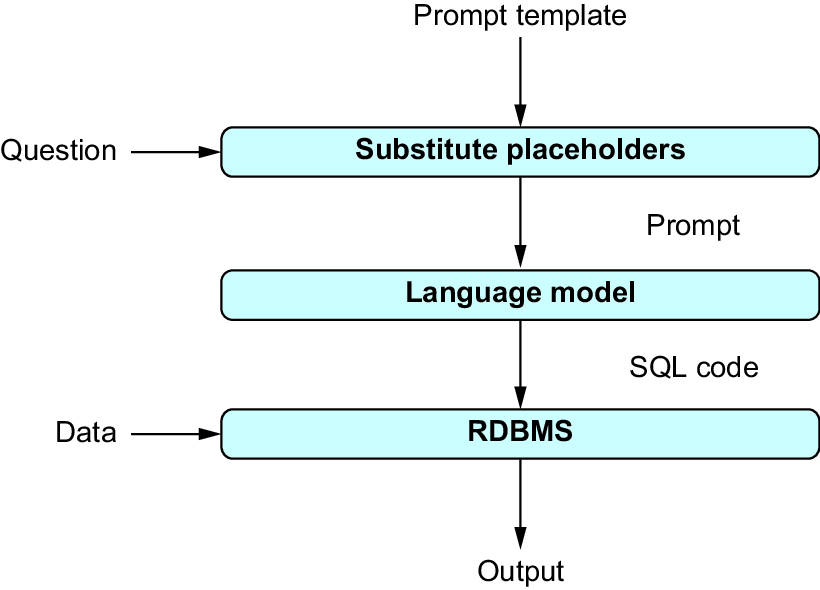
Follow the path from a question, through a prompt and generated SQL query, to execution by the relational database management system. section 1.4.2
For a more automated interface, a LangChain SQL agent can connect to an SQLite database file. In the games example, the agent first lists available tables, inspects the games table’s schema and sample rows, and checks a proposed SQL query. Those steps help it choose a query for a question such as which game sold most in 2016; they do not make its output automatically correct. section 10.4.2 section 10.4.4























