A database stores data so it can be retrieved and changed later. It is useful when cleaned data needs a lasting home and growing collections of files become awkward to manage. The right choice depends on how the data is organized and how it will be used. section 23.0 section 20.1
Common choices have different shapes and operating needs:
- Relational databases store and manipulate data in tables. SQLite keeps records in a local file and needs no separate server, making it handy for small applications and prototypes; it is not intended for large, high-traffic applications. section 23.1 section 23.2
- PostgreSQL and MySQL use database servers. Their Python clients are broadly similar to SQLite’s, but connections need additional details, and query-parameter syntax can differ. section 23.3
- NoSQL alternatives include Redis, a key-value store for quick in-memory access, and MongoDB, which stores BSON documents resembling dictionaries rather than table rows. MongoDB can suit distributed scale or changing schemas, but is not automatically the best choice. section 23.9 section 23.7
Python’s DB-API gives several SQL database clients a broadly consistent interface. With the standard-library sqlite3 module, connect to a database file, create a cursor, and execute SQL through that cursor. Bind values with placeholders instead of assembling them into SQL strings: sqlite3 handles value escaping. Commit changes when they should be saved, and close the connection when finished. section 23.1.1 section 23.2
Store and retrieve a record with SQLite
For a fresh database, the query prints [('Jill', 15)]: import sqlite3 conn = sqlite3.connect("datafile.db") cur = conn.cursor() cur.execute("create table people (id integer primary key, name text, count integer)") cur.execute("insert into people (name, count) values (?, ?)", ("Jill", 15)) conn.commit() print(cur.execute("select name, count from people where name=?", ("Jill",)).fetchall()) cur.execute("update people set count=? where name=?", (20, "Jill")) conn.commit() conn.close() The file holds the records; passing ":memory:" to connect instead holds a database in memory. section 23.2
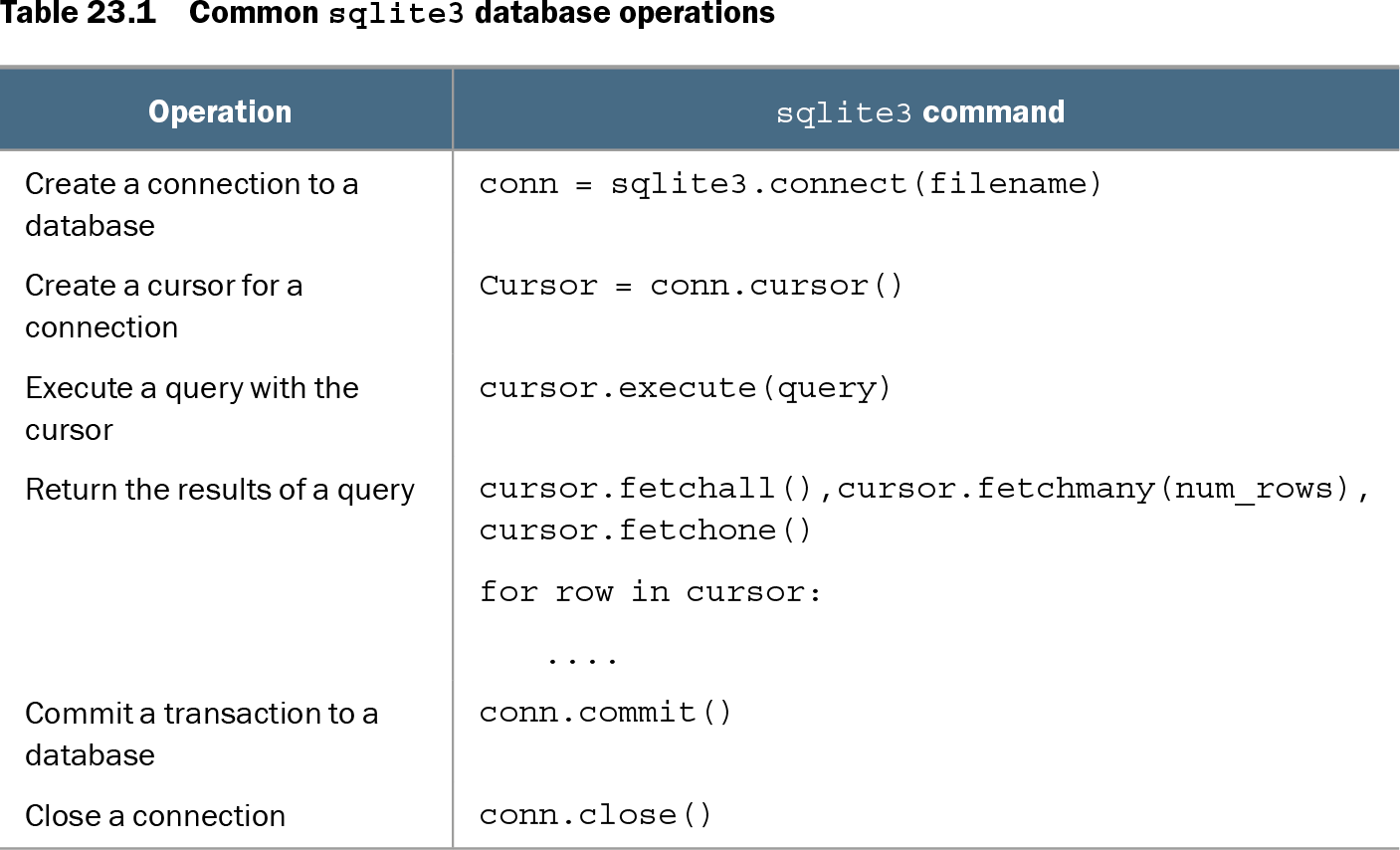
Table 23.1 Common sqlite3 database operations (view table figure)
| Operation |
sqlite3 command |
|---|---|
| Create a connection to a database |
conn = sqlite3.connect(filename) |
| Create a cursor for a connection |
Cursor = conn.cursor() |
| Execute a query with the cursor |
cursor.execute(query) |
| Return the results of a query |
cursor.fetchall(),cursor.fetchmany(num_rows), cursor.fetchone() for row in cursor: .... |
| Commit a transaction to a database |
conn.commit() |
| Close a connection |
conn.close() |
Use the operation table as a quick reference for connecting, fetching query results, committing, and closing. section 23.2
For an existing dataset, choose a database type, load the data, then test retrieval using likely search criteria. An ORM is another way to work with relational data through Python objects rather than writing SQL queries directly; it does not remove the need to choose a suitable database. section 23.8 section 23.9