A user saves a haiku, closes the browser, and returns later. To make the haiku available after they log back in, the app needs persistent storage outside the app itself. A relational database provides that storage and lets the app retrieve what it saved. section 8.2 section 8.1.1
A relational database organizes data into tables. Each row is a record, each column is an attribute, and a schema defines the columns’ data types and relationships between tables. A pandas dataframe also holds tabular data, but it lives in memory while a program runs; a database retains data after the program finishes. section 8.2.1
In a Streamlit CRUD app, the frontend supplies widgets for user actions, backend functions handle those actions, and the database stores users and haikus. CRUD means creating, reading, updating, and deleting records. section 8.1.3 section 8.0
To design the tables, work from the app’s requirements:
- Identify the entities: users and haikus. section 8.2.2
- Define their relationship: one user can write many haikus, but each haiku has one author. section 8.2.2
- List attributes before converting the model into a schema. Users have usernames and passwords; haikus have text, an author, a numeric ID, and a creation time. section 8.2.2
Figure 8.4 Database schema with a foreign key relationship between the users and haikus tables
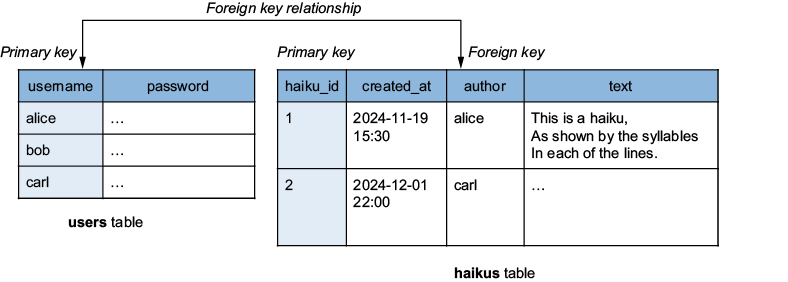
See how the users and haikus tables become a schema with a foreign-key relationship. section 8.2.2
SQL is the language used to create, manage, and query relational tables. Its commands support the same everyday workflows as the app: INSERT INTO adds rows, SELECT reads them, UPDATE changes them, and DELETE removes them. section 8.2.1 section 8.7
PostgreSQL is the relational database used for this transactional app; unlike analytics-oriented BigQuery, it is suited to frequent small record updates. Development starts with a local installation and a database created through psql. Production needs a separately set-up database server, potentially through a managed service. User passwords must be stored as hashes, not plain text. section 8.2.3 section 8.7























