A database is the top level of MongoDB’s data hierarchy. It contains collections, and collections contain documents. A relational database instead contains tables, which hold rows made up of columns. Keep this distinction separate from an Atlas deployment: a deployment provides the database environment, while a database organizes stored data within it. section 2.6 section 2.7
Figure 2.3 The terminology differences between relational databases and MongoDB (Image © MongoDB 2024 CC BY-NC-SA 3.0)
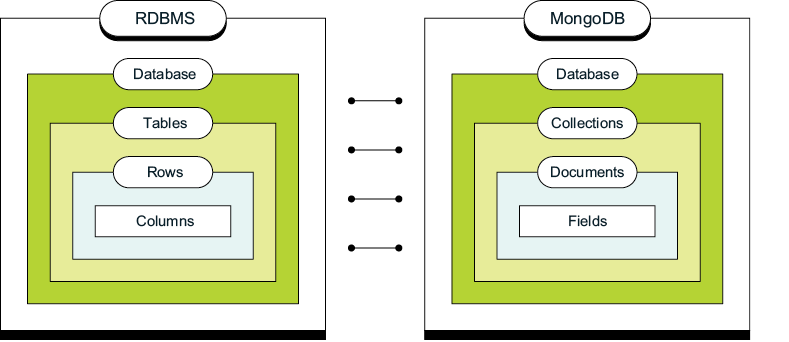
Compare the two hierarchies to locate the database level before translating between collections and tables. section 2.6
To work with a database in mongosh:
- Run `use booksData` to select the database context. The shell’s `db` variable then refers to `booksData`; a new mongosh session starts with `test` as its default context. section 2.6.2
- Run `db.books.insertOne({"title": "MongoDB 8.0 in Action"})`. Saving the document creates `booksData` and its `books` collection if they do not already exist; selecting the context alone is not the creation step. section 2.6.2
- Choose names carefully: database names are case-sensitive, but two names cannot differ only by case. Names must be nonempty, shorter than 64 characters, and contain no null character; further character restrictions depend on the operating system. section 2.6.2
The database is a container, not a schema design strategy. Within it, MongoDB collections can hold documents whose structures evolve as application needs change. Design those documents around the application’s reads and writes: storing related data together can reduce joins, whereas relational tables require a predefined schema and often join data from multiple tables. section 5.1.1 section 1.1
Inspect databases populated with sample data
Run `atlas clusters sampleData load "MongoDB-in-Action"` to start loading sample data into that cluster. The job creates test databases and populates their collections with documents. In the Atlas UI, open the cluster and select Data Explorer to inspect them. section 2.2
Do not treat every database as application space. MongoDB also uses reserved databases, including `admin` for system collections and user-access information, `local` for instance-specific replication data that is not replicated, and `config` for internal information. section 2.6.2























