A prompt is an instruction or other input given to an AI model to produce a response or perform a task. It may contain a question, command, photo, document, or web address. Clear purpose matters: vague inputs rarely produce useful results. section 3.1.1
Small changes in specificity, tone, and structure can produce very different results. Prompt engineering, also called prompt design, is the practice of shaping prompts to obtain accurate, relevant, or creative output. section 3.1.1
A useful prompt often identifies:
- The role or perspective the AI should use, such as an ESL teacher. section 4.4.1
- The task and the information needed to complete it. section 4.4.1
- The desired response format, tone, audience, or level of detail. section 1.8
- Examples, rules, or reference material when the task is complex. section 12.2.2
- A request for explanation, questions, or another interaction when learning is the goal. section 4.4.1
From a broad request to a focused prompt
A basic request is: "How can I be a good project manager?" This zero-shot prompt leaves the AI to decide the direction. A focused version could specify the audience, workplace context, desired format, and topics such as planning, communication, risk, quality, budget, and time. For difficult work, test the prompt on one item, learn from the result, and refine it before increasing the batch size. section 5.1.1 section 12.2.2
A prompt for learning
I want you to act as an ESL teacher. I will write to you in American English. Correct my grammar and punctuation, explain each error, and ask me a question so we can continue practicing. This works better than simply asking for correction because it defines the role, task, explanation, and interaction format. section 4.4.1
Treat generated output as a draft, not an authority. Review it for accuracy, clarity, balance, tone, bias, privacy, security, compliance, and fit with the real task. AI can assist professional work, but it cannot replace human reasoning or responsible decisions. section 1.7 section 16.1.1
Figure 1.7 APA citation (Image source: University of Waterloo Libraries, “AI-Generated Content Citation”; https://mng.bz/PdVg)
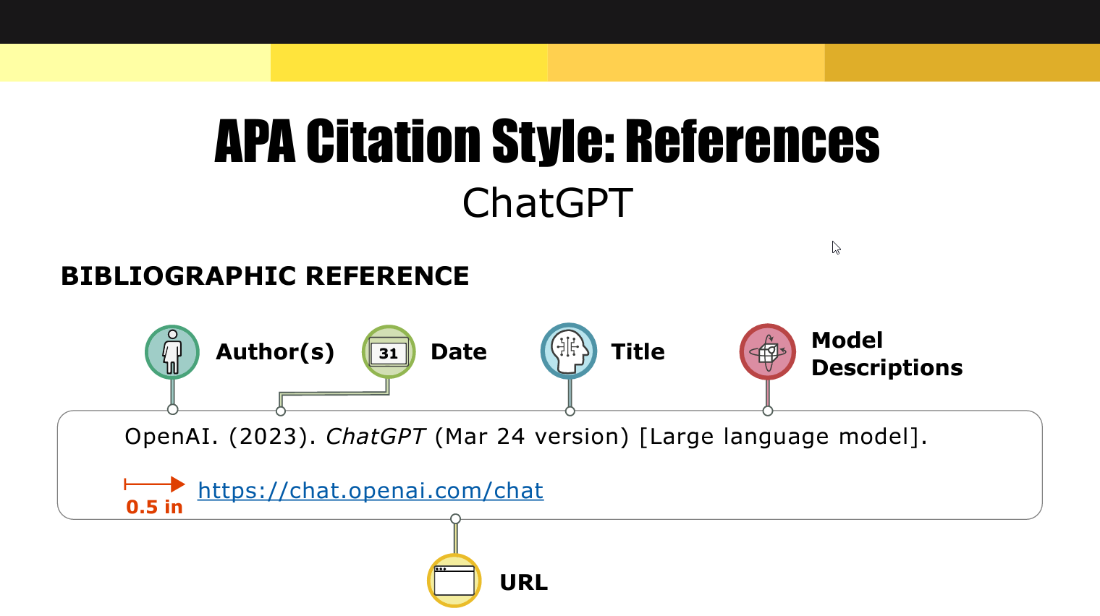
Use the citation example when AI-generated content must be identified and cited according to school or workplace rules. section 1.6.4

















































