A prompt is a natural-language description of the content you want. In text-to-image generation, it names a scene for a model to create; in image retrieval, it describes an existing image to find. The same words can therefore drive different operations. section 1.0 section 8.1.2
A model does not use the prompt as raw prose throughout the pipeline. A text encoder first converts it into numerical embeddings. Those embeddings can be compared with image embeddings to rank matches, or used as conditioning information while an image generator produces an output. section 8.1.2 section 10.2.1
Follow a prompt through three practical workflows:
- Retrieve: CLIP encodes “A dog plays on the beach,” compares its embedding with embeddings of Flickr 8k images using cosine similarity, and ranks the images. section 8.1.2
- Generate with diffusion: Stable Diffusion encodes the prompt, uses its embeddings to condition iterative denoising of a random latent image, then decodes the latent image with a VAE. section 10.2.1
- Generate with image tokens: min-DALL-E tokenizes a prompt, encodes it with BART, autoregressively predicts 256 image tokens, and reconstructs an image with VQGAN. section 12.1.2
Prompt preparation is part of implementation. Stable Diffusion’s CLIP text encoder accepts 77 tokens: shorter inputs are padded and longer ones truncated. In a min-DALL-E implementation, the conditional prompt and an empty, unconditional prompt become separate rows of a padded 2 × 64 token tensor. The empty prompt also supplies an unconditional embedding for classifier-free guidance, which controls the balance between conditional and unconditional generation. section 10.2.1 section 12.2.1 section 10.3
Send a prompt to Stable Diffusion
Set `prompt = "an astronaut in a spacesuit riding a unicorn"`, load the pretrained `CompVis/stable-diffusion-v1-4` model with `StableDiffusionPipeline.from_pretrained(...)`, and obtain an image with `pipe(prompt).images[0]`. For hands-on inspection of the input stage, tokenize “a lion” with `CLIPTokenizer` and pass its IDs to `CLIPTextModel`; the resulting embedding has shape `(1, 77, 768)`. section 10.1 section 10.3
Figure 10.5 How Stable Diffusion converts text prompts to images. Stable Diffusion has three main components: a text encoder, a U-Net, and a VAE decoder. The text encoder converts text prompts such as “a lion” or “a tiger” into text embeddings. The U-Net conducts the reverse diffusion process in the latent space, using the text embeddings as the conditional information. The generated latent images are then converted by the VAE decoder into high-resolution images as outputs.
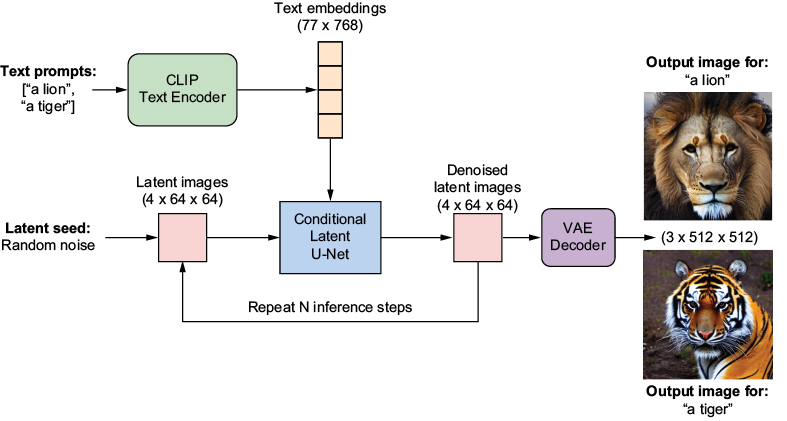
Trace where the prompt becomes an embedding and how that embedding conditions denoising before VAE decoding. section 10.2.1

















































