A prompt is input text that directs a generative AI system toward a desired output. It can ask for text, images, or code, but output quality depends on how clearly the instructions express the intended outcome. Prompts guide generation; they do not remove the need to check accuracy, fairness, or usefulness. section 4.1.4 section 4.1.5
Treat prompting as an iterative design activity. Start with a specific request, inspect the result, then revise the instructions when the output is not suitable. Generated responses can vary between runs, so refine the details that matter rather than expecting one fixed answer. section 4.2 section 4.3.3
Structure the prompt around the kind of output needed:
- For ChatGPT, state a role, the intended audience, and a task. A role shapes the communicative goal; an audience changes the language and emphasis; the task states what to produce. section 4.2 section 4.2.2
- For DALL-E, specify a subject and a style. If an image is unsatisfactory, edit a selected area and provide a new prompt for that portion. section 4.3 section 4.3.3
- For code assistance, use specific, unambiguous instructions in simple language, and retain responsibility for development decisions. section 4.6
Generating chart context
To create titles, annotations, or commentaries for a visualization, combine role, audience, topic, and text type. Describe the topic through its scenario, data, and insight. For example, an inspirer can be asked to write five titles about sports-improvement data and the finding that rowing and cycling exceed a 50% baseline. section 7.3 section 7.3.1
Turning a finding into next steps
A prompt can ask for practical options or their sequence. Given a campaign with too few dog participants, request five ways to encourage sharing of dog-related information, then reshape the suggestions into a visual roadmap. Treat proposals as starting points and verify their feasibility with further investigation. section 9.2.1 section 9.2.3
Figure 7.4 The schema used to generate context
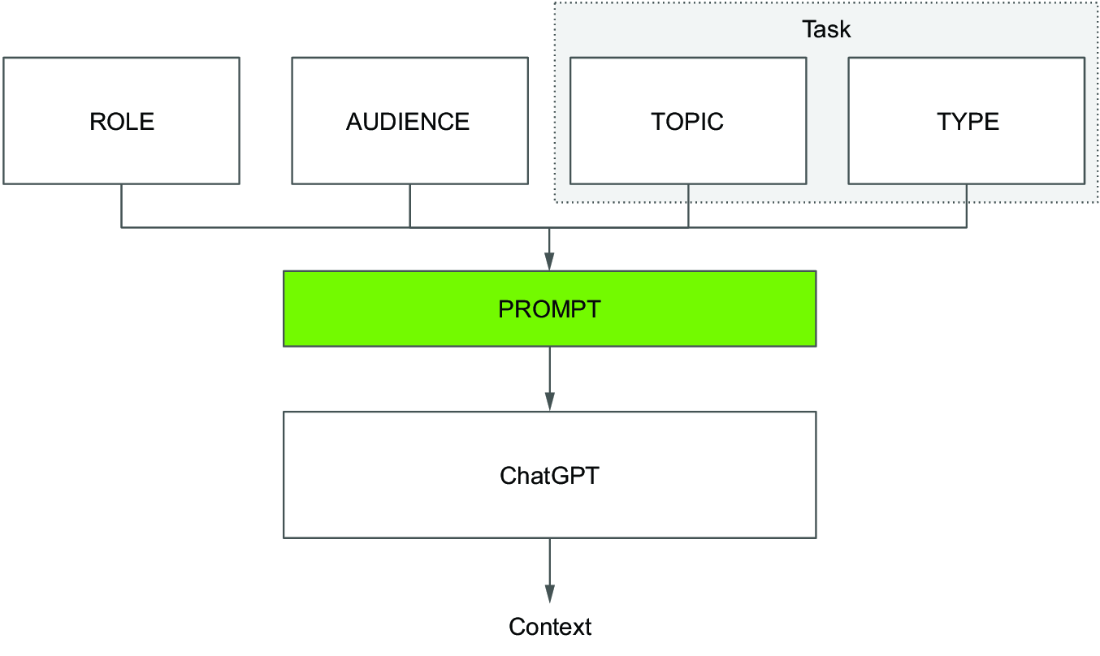
Use the four-part context schema to see how role, audience, topic, and text type combine into a prompt for chart annotations and commentaries. section 7.3

















































