A prompt is a natural-language instruction sent to a generative AI tool to request an answer, design, code suggestion, analysis, or other result. Its quality strongly shapes the usefulness of the response: state the task, give relevant context, specify constraints, and ask for the format you need. section 9.0 section 9.1
Treat prompting as an iterative collaboration, not a one-shot command. Start with a focused request, inspect the result, then add missing details or revise the direction. Short prompts suit narrow questions; larger design or UI requests need objectives, data, requirements, and desired output. section 3.9 section 7.1
Build more reliable prompts by including only the details that help the tool act:
- Give a role when its perspective or style matters, such as a software design expert or product owner. section 3.3
- Name the concrete task and provide surrounding code, project details, data, constraints, or error messages. section 2.1.1 section 9.1
- Request specific deliverables, such as an explanation, fixed code, validation, tests, structure, pitfalls, or a software design document. section 3.3 section 9.1
- Break large or complex requests into smaller prompts, try alternatives, and keep prompts that work well. section 2.6
- Review, test, and adapt generated code instead of accepting the first answer. section 2.6 section 6.3
Turning a vague debugging request into an actionable one
Instead of “Fix this code,” describe the Python function, the negative-value error, and the code; then ask the tool to identify the bug, explain it, add input validation, and provide test cases. The added context and explicit outputs produce a more useful starting point, but the proposed fix still needs verification. section 9.1 section 3.9
Figure 9.1 A quality prompt starts with clear context, specific instructions, and an expected format. The better the input quality, the better the result.
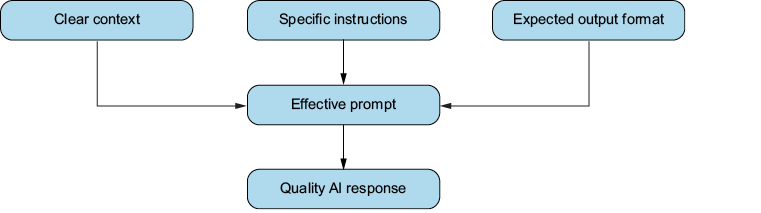
A visual checklist shows how context, clear instructions, and an expected format turn a basic query into a higher-quality prompt. section 9.1

















































